The morning after the week before

A few bleary-eyed thoughts on the European elections…

The Greens
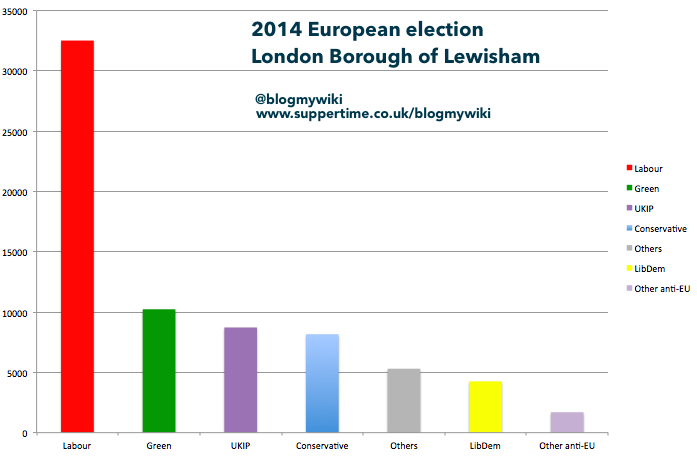
The Greens did astonishingly well in Lewisham, coming second. They got 10228 votes to Labour’s 32507. UKIP, however, actually did quite well on 8720 votes, beating the Conservatives into 4th place on 8161. Labour won all but one council seat in Lewisham last Thursday – if we had proportional representation for council elections, might we have UKIP councilors even in Lewisham?
Nationally, things aren’t so rosy for the Greens – they have 3 MEPs, but it seems that in London and the South West of England they may owe those seats to the UKIP vote being split by the alphabetically cheeky ‘An Independence from Europe’ party being listed first on the ballot paper. In the South West ‘An Independence from Europe’ got 23,169 votes, coming a distant 6th behind the LibDems, and in London they got 26,675 votes.

Indeed, I’ve made a bar chart for the Lewisham result, grouping the ‘other’ votes into anti-EU others, and ‘other’ others – either pro or neutral on Europe. I make the anti-EU others (including the BNP) add up to 1691 votes, and if you add that to UKIP, you get 10411 votes, slightly ahead of the Greens on 10228. This bar chart also shows the LibDems getting fewer votes than the ‘others’, whether you split them on EU lines or not.
Proportional Representation
I’ve never been a big fan of PR*, and last night has done nothing to change my view. For years the Liberal Party, the SDP and the LibDems have blamed lack of PR for their lack of representation in Parliament. Well, the European Parliament is elected by PR, and the LibDems were all but wiped out. Where are the people who say ‘first past the post’ is undemocratic this morning? Oddly quiet. If we had PR in Westminster and local council elections, UKIP would likely be the biggest party in the House of Commons, and Nigel Farage would stand a good chance of becoming Prime Minister. I’d like to hear someone ask Nick Clegg about what he thinks about PR now.
*I mainly dislike PR because it usually reduces geographical accountability. I think that’s why so few people know, or care, who their MEP is. Does a person seem like ‘my’ MEP if they represent an opinion I’m vaguely sympathetic with across a huge geographical area? If each area, South East London for example, had its own MEP, I think people would feel more connected with the European Parliament, and that would be good for democracy.

Two Nations
(Or possibly three, if Scotland becomes independent – see below.) There’s That London. And everywhere else. As Nick Robinson pointed out this morning on Radio 4, this poses a huge problem for Labour. London Labour MPs are saying they should stand up to Farage, challenge his Little Englander views. That’s fine in London, where Labour are now very strong and UKIP relatively weak, but Labour MPs from elsewhere (the North East and North West) are singing a different song. Londoners may say they are pandering to racism, but those MPs have presumably knocked on more doors in their constituencies than I have, and I can only assume what they hear on the doorstep mirrors what happened at the ballot box. For example, in the North East (Labour heartland, surely?) UKIP came a close second, 177,660 votes to Labour’s 221,988.


Labour may also be mindful of what just happened to a politician who had the courage of his convictions: Nick Clegg didn’t duck the issue of Europe, he fought a campaign based on what he passionately believed to be right when many other politicians kept quiet – and his party was annihilated at the polls.
The other problem for Labour is that amazingly few of UKIP’s votes came from the Conservatives. They can’t all have come from the BNP, so where did they come from? I suspect a lot came from people who would have voted Labour in different circumstances.

Scotland
Alex Salmond will paint the English as boggle-eyed and inward-looking (pot, kettle, anyone?). The likely election of a single UKIP MEP in Scotland is a midge in that ointment – how much of one, remains to be seen. I’m amazed that so little attention has been focused on the real earthquake to come: the effect that Scottish independence would have on English and Welsh politics. I don’t even want to think about it. And I’m pretty sure Ed Miliband doesn’t want to think about it either. Plus, of course, anyone living in England or Wales (Scottish, English or Welsh) doesn’t get a vote, despite the fact that the outcome affects England and Wales every bit as much as it affects Scotland.

Blame the Media
Well, that means: blame the BBC, never mind how much coverage Sky or ITV News have given UKIP – or, as a friend points out, how much coverage UKIP got on Twitter from people complaining about UKIP and/or the BBC.
Last week I predicted an avalanche of criticism for the BBC when UKIP did well. UKIP did well. People are blaming the BBC. But not quite as much as I expected. I’ve been heartened to see, at least among the people I follow, just as many people blaming Russell Brand for encouraging people not to vote. How’s that working out, Russell? Mmm? *Stewie Griffin voice*
Want to blame someone for UKIP’s airtime? How about Ofcom?

Update
I tried to compare the 2014 results with the last European elections in 2009, but I’m confused about the geographical areas for the count. The Lewisham council website’s figures for 2014 are for the London Borough of Lewisham, but 2009′s are for ‘Greenwich and Lewisham’ – so I assume this means the figures can’t be directly compared. I’d be grateful for advice on this. Oddly, if you do compare them, the numbers of votes cast for each party are only radically different for Labour.
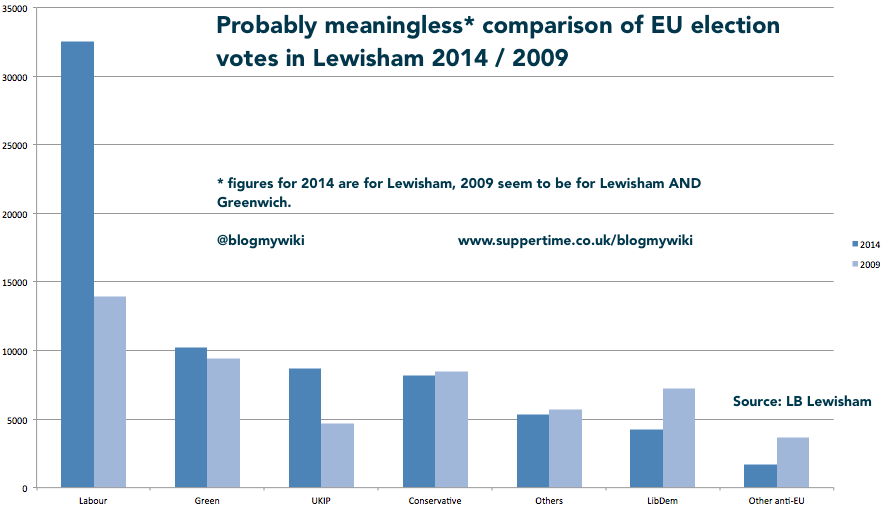
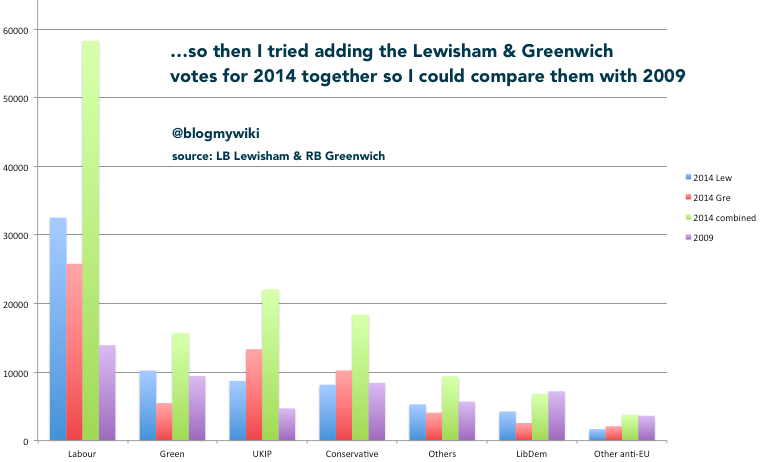
So, if the count areas were different, and I can’t split the 2009 Greenwich numbers off from Lewisham, how about I combine the 2014 Lewisham and Greenwich votes to make a more meaningful comparison? Well, I tried that and the picture is no less confusing.

I thought turnout may be an issue: it was apparently 38.9% in Lewisham AND Greenwich in 2014 – though the fact that both boroughs report exactly the same figure makes me suspicious. In 2009 the turnout for both boroughs was 30.79% – lower, but was it low enough to account for the massive spike in Labour votes in 2014?
My conclusion: it’s amazing what I’ll do in order to avoid marking and planning. And I should stick to the day job.
Posted in Uncategorized | Tagged , , , | Leave a comment

Screen recording & controlling Raspberry Pi on a Mac with no extra software

It’s been bugging me for a while about how to do screen recordings on a RaspberryPi – it may be possible to do it using ffmpeg, but today I found a pretty easy way of doing it from a Mac, without installing any extra software on the Mac.

First you need to install VNC on the Raspberry Pi, which needs to be connected to your local network and the internet by wifi or ethernet. I did this by typing
sudo apt-get install tightvncserver
at the command line on the Raspberry Pi. I then typed
tightvncserver
and set up a password for VNC, which you’ll need later on. Make a note of the IP address of the RaspberryPi

I then started a new VNC window by typing:
vncserver :2 -geometry 1024x600 -depth 24
The :2 is the number of the window. As I already had the graphical interface open on the RaspberryPi, I couldn’t use 0 as that’s the Pi’s main window, and 1 is the second normal desktop window. I used 1024 x 600 for my new VNC window as I was using a Hackintosh netbook, but pick whatever screen resolution suits you.

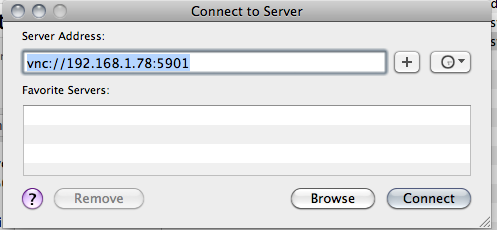
There are several ways you can connect to the Pi at this point. You can use any VNC client on just about any computer or tablet, but Mac OS X has a VNC viewer built in. It’s called ‘Screen Sharing’ and you can access it by typing vnc:// followed by the IP address into Safari, or by using Apple/Command-K to ‘Connect to Server’. I entered
vnc://192.168.1.78
to connect to the Pi from the Mac, entering the password I set up earlier. 192.168.1.78 is the IP address of my Pi on my local network (yours will be different) and 5902 refers to VNC window 2. 5901 would be the Raspberry Pi’s normal second desktop window.

You can then control and view the Raspberry Pi from the Mac – but you can also make a screen recording, and without installing any extra software.

Open Quick Time Player and go to File > New Screen Recording. You can use the built-in mic on your Mac to record a lovely commentary.

The major drawback of this method is that the Mac Screen Sharing client won’t go full-screen (at least not on OS X Snow Leopard) – but other Mac VNC clients are available which will do this.

If you want to know more about VNC on the Raspberry Pi, have a look at this guide: http://elinux.org/RPi_VNC_Server

Posted in Apple, MacOS X, Raspberry Pi | Tagged , , | Leave a comment

Tweeting photos from PS2 EyeToy on Raspberry Pi


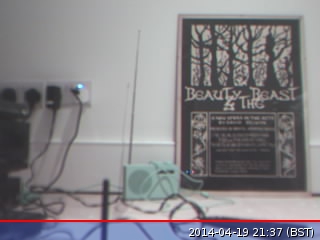
It took some fairly heavy footling and jiggery-pokery, but I finally managed to get my Raspberry Pi to run a Python script which takes a photo on a webcam and tweets the picture – meaning I could set up a tweeting web cam.

I made life hard for myself because the only webcam I had to hand was an old Sony Playstation 2 EyeToy. This used to work with the Raspberry Pi, but recent changes to the Linux kernel used in Raspbian means that, at the time of writing, it doesn’t – you get horrid error messages about ‘bogus Huffman table definitions’. The easy thing to do would be to use a supported webcam, like the Playstation 3 Eyecam, or one favourably listed here: http://elinux.org/RPi_USB_Webcams

I got the PS2 EyeToy working by loading an experimental version of the kernel as outlined here: http://www.raspberrypi.org/forums/viewtopic.php?f=28&t=70437

I backed up all the important files from my Raspberry Pi before doing this. Updating the kernel seemed to break the guvcview webcam viewer, but fswebcam still works, so that’s what I use to capture the image. This means I don’t currently have a way of viewing ‘live’ pictures from the webcam, so focusing it was a tedious process of trial and error improvement. Ideas welcome!

I needed to plug the EyeToy into a powered hub – it didn’t work plugged into my old iMac keyboard.

To get Twitter working on the Raspberry Pi, I more-or-less followed the instructions here: http://www.makeuseof.com/tag/how-to-build-a-raspberry-pi-twitter-bot/ with a few changes. The Twitter web pages they describe have changed slightly, but it’s reasonably easy to follow them.

In short, I installed Twython, registered a Twitter app to get the keys you need, installed fswebcam (sudo apt-get install fswebcam) and wrote some Python code to grab a picture from the EyeToy and tweet it. I couldn’t get the pygame camera modules that they used in the Make Use Of tutorial to work, so I used fswebcam instead to grab a JPEG.

The line
sudo fswebcam -r 320x240 -S 20 webcam.jpg
captures the image. 320×240 is the (tiny!) resolution of the PS2 EyeToy, and the -S 20 bit waits 20 frames before grabbing the image to allow the camera to stablise. Without this I was getting weird frame-sync problems.

I saved a Python script called cam.py (code below) which I made executable by typing
chmod +x cam.py
and I ran it by typing
python cam.py

And here’s the tweet: the photo was taken and tweeted all by the Python script below.

I guess I need to get a better web cam now, and train it on the London skyline. Or endlessly tweet the Pi’s CPU temperature. THAT would be good…

My Python script looked like this:

#!/usr/bin/env python
import sys
import os
from twython import Twython
CONSUMER_KEY = '**YOUR KEY HERE****'
CONSUMER_SECRET = '***YOUR SECRET HERE**'
ACCESS_KEY = '**ACCESS KEY HERE******'
ACCESS_SECRET = '***ACCESS SECRET HERE*****'

os.system('sudo fswebcam -r 320x240 -S 20 webcam.jpg')

api = Twython(CONSUMER_KEY,CONSUMER_SECRET,ACCESS_KEY,ACCESS_SECRET)
photo = open('webcam.jpg','rb')
api.update_status_with_media(media=photo, status='Photo taken & tweeted by PS2 EyeToy on RaspberryPi ')

You could then use cron to schedule the running of this script every hour or whatever you liked. Get it triggered by a button or MakeyMakey. Turn it into a tweeting photo booth for a party. Ideas, ideas…


Update

I’ve tweaked the script a bit now. I added a title to the picture like this:

os.system('sudo fswebcam -r 320x240 -S 20 --title "@blogmywiki gardencam" webcam.jpg')

I also set it to automatically tweet a picture every hour on the hour by typing
sudo crontab -e
and adding this line
0 * * * * python /home/pi/tweet/cam.py

(If you try this you’d need to include the full path to where your script lives – mine is in a folder called ‘tweet’).

Posted in Raspberry Pi | Tagged , , | Leave a comment

Visual MaKey MaKey Scratch piano

I liked the simple piano I used for the Potato Piano, but I wanted something with some visual feedback, so I just made this one. It works just the same, you wire up some vegetables, PlayDoh, stairs, children etc to the arrow and W A S D keys on the MaKey MaKey and off you go, playing tunes by doing the mash potato.

My Scratch piano only has 8 notes on display, and shows you which notes are being played by lighting them up in the appropriate colours (I’m not sure of the value of coloured musical notation, but it looks pretty!)

You can play it on the Scratch web site at http://scratch.mit.edu/projects/20728937/, or download the Scratch 1.4 code by right-clicking here. (I still use Scratch 1.4 because it’s what we have installed in the schools I work in, and it runs on a RaspberryPi – but I will get into Scratch 2, I promise!)

Here I am ‘playing’ the Potato Piano with the old Scratch project:


filmed by the Tillster (8)

Posted in Arduino, computers, ICT, music | Tagged , | 2 Comments

Adding a station and summertime to PiRadio

“Summer’s here! It’s time for MAYONNAISE!”

I think that was how Bill Bryson described a typical British women’s magazine strapline of the 50s or 60s. Summertime also means that my PiRadio is displaying frosty old GMT, so I need to change its timezone to account for British Summer Time.

To do this, I SSH’d in to a command line on the PiRadio and ran

sudo raspi-config

and picked option 4 – ‘Internationalisation Options’ to select London Town.

My good friend Rycharde recommended a Dutch jazz radio station called Sublime, so I wanted to add that too. So again, at the command line I typed

mpc add http://82.201.47.68/SublimeFM2

to add a new station. This also meant that I needed to edit my main python code to allow for the extra station:


if key == "UP":
station += 1
if station > 9:
station = 1

and

elif key == "DOWN":
station -=1
if station < 1:
station = 9

(9 rather than 8, as I had 8 stations in my playlist before).

We'll see if Sublime is as good as the mighty Fip...

And they say the living is 'easy' - hah!

Posted in radio, Raspberry Pi | Tagged , , , | Leave a comment