

What is TypeStick?
TypeStick is a painfully simple and abstruse utility that enables you to easily set type on web pages where the type is made up of individual images, one for each letter of the alphabet.
This works best with bitmapped fonts that are blocky and have no anti-aliasing - using Photoshop or similar make a transparent GIF for each character with a small amount of space to the right and left of each letter.
The idea was originally to allow the type to be scaled - you'd create only the smallest font size you need and you'd get the web-browser to do the scaling. Alas, Apple's Safari browser doesn't scale images
in the way I expected - it tries to anti-alias or smooth the images, even if the size you've selected is
an exact multiple of the original image size.
How do I use it?
It's fairly self-explanatory if you get the basic concept!
Create one image for every letter of the alphabet - I would recommend using blocky bitmapped fonts on a transparent background. Make sure anti-aliasing is switched off if you want to be able to use the type on different colour backgrounds. Save the images as transparent GIFs in a folder and name them a.gif, b.gif etc and have a spacer called space.gif - this needs to be wider than your narrowest character but not as wide as the widest (probably M or W).
Lower case letters need to be called lc-a, lc-b etc. and punctuation needs to be spelled out as follows:
| ASCII | Character | filename |
| 32 | space | |
| 33 | ! | exclamation |
| 34 | " | dblquote |
| 36 | ? | question |
| 38 | & | ampersand |
| 39 | ' | sglquote |
| 42 | * | asterisk |
| 43 | + | plus |
| 44 | , | comma |
| 45 | - | dash |
| 46 | . | dot |
| 47 | / | fwdslash |
| 58 | : | colon |
| 59 | ; | semicolon |
| 64 | @ | at |
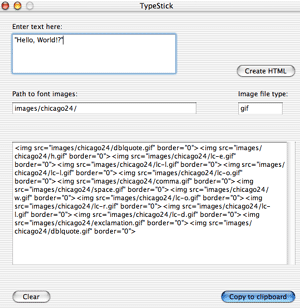
Type the text you want to set in the top box, and press the 'Create HTML' button next to it. HTML appears in the window below, and when you press the 'Copy to Clipboard' button the HTML is, er, copied to the clipboard. You can then paste it into your text editor, Dreamweaver or HTML editor of choice.
You can specify the image path which can be relative or absolute (I would recommend a separate folder for each font and font size); you can also specify the image type so you could use PNGs (or even JPEGs if you're really weird).
Download TypeStick 1.3
TypeStick will soon be available for Classic MacOS, but for
now it's just OS X and Windows (while I develop it). It's available as a compressed disk
image for Mac or Zip for Windows with one tiny font, EightBit - which I think came from the good people at
Dinc.
To download current Mac OS X version click here
To download current Windows version click here
It's Freeware!
Linux version
TypeStick is written in RealBasic which compiles Linux x86 code, but as I only have PowerPC-based Macs
at home, I've no way of testing it - I'd be really grateful if someone with Linux running on x86
hardware could test it for me:
Download untested Linux x86 version
Why is it called TypeStick?
Oh, yes, a terribly dull name. I was going to call it MoveableType or HotMetal but I think
those names are already taken. Then it occured to me how much setting type this way
reminded me of setting lead type for my old Adana printing press in a metal compositing stick. 'CompositingStick' is a bit of a mouthful, so I shortened it to TypeStick.
Who wrote it?
TypeStick is written by Giles Booth.
I used to program a lot in BASIC for the Commodore PET and
Sinclair Spectrum, and even in 6502 assembly language a bit. I then didn't use
computers for a decade or so and I have
problems getting my head round this object-orientated stuff!
The idea came from
Jon Ward and
it was inspired by the Lomography web site,
plus of course the work of the genius Susan Kare who
created the original Macintosh system fonts and icons amongst many other fine things.
To-do list
Version history


