Recently I’ve been going through the peculiar hell that is the Teaching Agency maths skills test. Anyone who wants to be a teacher has to pass this, even if you just want to teach GCSE English. Everyone says ‘you’ll be fine’ – at least everyone who’s not tried to sit this test. It’s been made more rigorous, you see. It’s a pig.
There are 12 questions that are spoken, and by the time the voice has finished, you have a mere 18 seconds to type the answer, without using a calculator. The problems are not trivial or simple. After your time is up, it clicks over to the next question. You can’t go back and review an answer. And if you get one straight away (working in radio means I’m quite good at adding and subtracting time), you can’t click forward and use the time for a harder question. It’s torture. If you’re a masochist with time on your hands, you can try it yourself here: http://www.education.gov.uk/QTS/Numeracy/assessment_engine.html
An esteemed colleague has suggested that, if asked for feedback, I should say that I’d have enjoyed the mental maths section much more if the questions had been read in person by the Secretary of State for Education. Unfortunately, my opinion has not been sought.
The next part of the paper comprises 16 questions, mostly about interpreting visual representations of statistical data: tables, scatter graphs, bar charts, even pie charts (which I now know, thanks to @clogsilk, are evil).
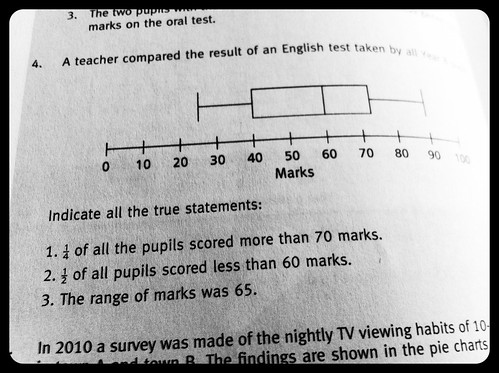
The sample papers all include something most of you will never come across: the box and whisker diagram. I met one candidate at an interview whose boyfriend had a maths degree, and he’d never heard of them. But I got to grips with them, I thought I understood them… until I tried the sample question pictured above (in a book on passing the exam).
On the diagram, the box & whiskers tell us: the lowest mark was 25, the highest mark was 90, the median mark (the one in the middle when you line them all up) was 60, and the inter-quartile range is from 40 to about 73.
These facts are not in question. True or false answers are required. Maths is an exact science, right? Some people find comfort in numbers. Numbers are not like people. Numbers are reliable. They do not do mad things randomly, like push you in a canal, fail to call you back or tell you that green isn’t your colour.
My answers were TRUE, FALSE, TRUE.
The book said: FALSE, TRUE, TRUE.
I think the book is wrong. For the first statement, they say that a quarter of the pupils DIDN’T get over 70. Well, the upper quartile is about 73, so a quarter of them certainly got more than 73, and the last time I checked, 73 was more than 70. Okay, that quarter didn’t get any marks between 70 and 72, but they DID get more than 70.
The second one is a bit less clear, but I’m sure I’m right and the book is wrong. Bear with me here. We know the median is 60. This means if you line all the scores up in a row, 60 will be in the middle – or the two values either side have a mean value of 60. We’re not told how many pupils there are. If there’s an odd number of pupils, that means one pupil scored exactly 60, because they are in the middle (the median). This means that half the pupils scored 60 or less, but it’s false to say that half the pupils scored less than 60 – slightly fewer than half got less than 60.
Some may say I’m splitting hairs, some say it’s the words that are the problem here, not the numbers. But the words seem quite clear to me. It’s the cold, hard binary answers that are wrong.
Anyway, I passed my skills test. With a little help from my friends.
Lewisham A&E has not been reprieved. An A&E that does not admit blue lights, that takes the 75% of the less-seriously ill people who would have gone before, which refers the seriously ill to another hospital, is not an A&E. It is an urgent care centre with a different name.
I would like someone to stand up in the House of Commons and ask a simple, direct question (why do MPs so often ask long, multiple questions when a single inquiry would be so much more effective?): What, exactly, is the difference between the proposed downgraded A&E and the urgent care centre proposed by the Special Adminstrator?
It’s not always obvious that a condition is life-threatening. My wife was taken to Lewisham A&E – we didn’t know it at the time, but she had a ruptured ectopic pregnancy. This was quickly diagnosed by Lewisham A&E and she was rushed into theatre. She had lost 5 litres of blood when they opened her up. If she’d then been sent to Woolwich she’d have been dead by the time she got there.
Her first pregnancy was apparently straightforward. But when our eldest son was born, he was unexpectedly small and had a blood condition call polycythemia – he was rushed straight into neo-natal intensive care in Lewisham, just a couple of floors away from where he was born. He spent 2 weeks there and they saved his life. The pregnancy appeared to be normal, but we unexpectedly needed serious medical intervention.
Things are not always what they seem. You can’t always tell if a medical problem is serious until it’s too late.
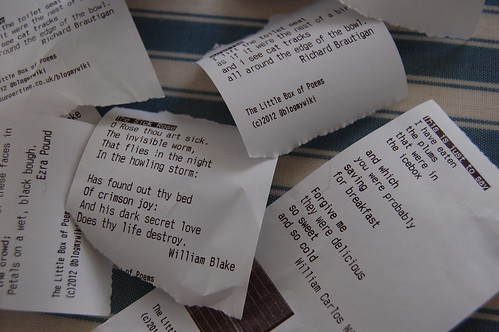
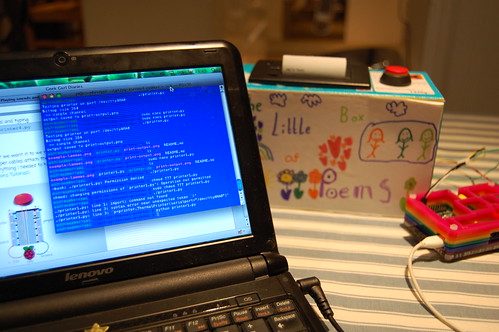
Back in October 2012 I made my first Little Box of Poems – this is a self-contained box that prints out a random short poem when you press a big red shiny button. I like having poems instead of receipts in my wallet. And it makes a good educational project combining physics (wiring), DT (making the box), ICT (programming) and English (writing or finding poems).
It was made using a little £40 Adafruit-type thermal printer and an Arduino microcontroller. I found that I could only get about a dozen short poems in the Arduino before it started spewing out gibberish, I guess because it ran out of memory. I could have claimed this as some sort of machine-generated found-poetry art project, but I wanted proper poems like what the poets originally wrote.
As luck would have it, my original Arduino-based Little Box of Poems inspired Carrie Anne Philbin to make The Little Box of Geek. This is another box that prints random stuff when you press a button – in this case random nuggets of geeky wisdom. Crucially, Carrie Anne used a Raspberry Pi instead of an Arduino. This means you can add much more stuff into your box, and also opens up the possibility of getting stuff off the internet. Do have a look at her blog and videos posted under the Geek Gurl Diaries banner – her aim is to get girls more engaged with IT and ICT in school.
Here, roughly, is how I made a Raspberry Pi-based little box of poems.
You will need:
A Raspberry Pi with bog-standard Raspbian OS installed.
At least 5 female > male breadboard jumper wires to connect to the GPIO (general purpose input-output) pins on the Raspberry Pi. These are the prongs on your Pi that let you do cool stuff with things in the real world like you can with an Arduino.
A small breadboard
A 10k Ω resistor
A power supply for the Raspberry Pi
A hefty 1.5A power supply for the printer that gives between 5 and 9 volts.
While you’re building it, you’ll need a screen, keyboard and mouse for your Raspberry Pi – OR a computer, phone or tablet with an SSH client on it (any Mac or Linux box will work admirably). These aren’t needed once you’ve set it up.
An old Fairy washing tablet box or similar
Some short poems, haikus, limericks etc.
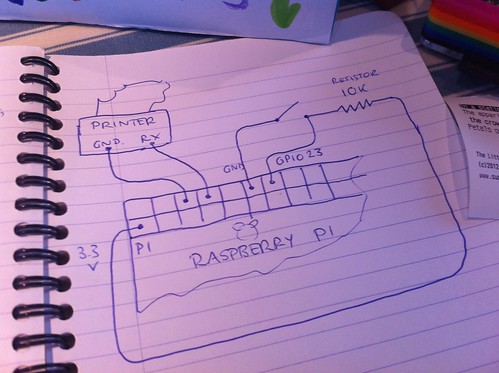
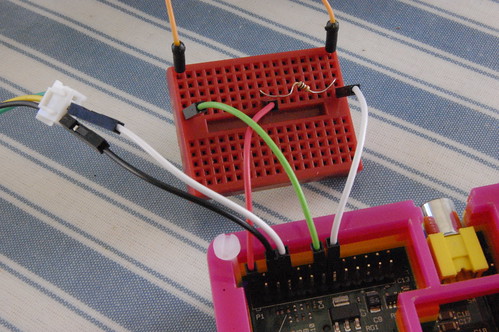
This is a simple diagram of the wiring needed. I had to buy some breadboard female to male leads from Maplin in order to get access to the GPIO pins on the Raspberry Pi – these meant I had to take the lid off my lovely PiBow case. If you had a proper ribbon connector this wouldn’t be a problem. Do NOT try to use an old hard drive IDE ribbon cable to connect to the GPIO pins – they short out certain pins and will likely Fry Your Pi:
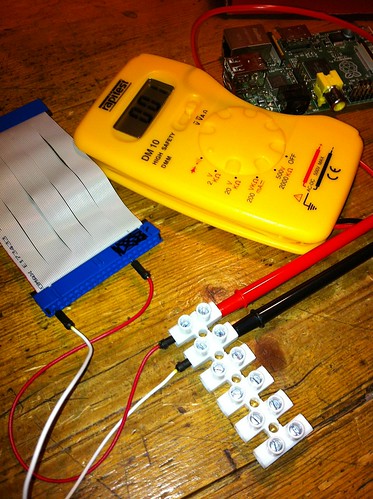
proving an IDE cable has shorts and should not go anywhere near your Pi
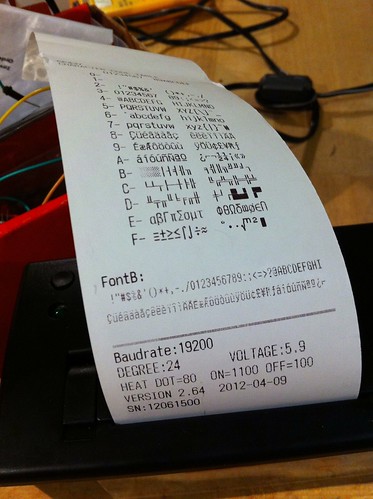
1) Fill your printer with till-roll and hold the printer button down while you connect it to that hefty 1.5A 5-9v power supply. A test sheet should come out looking like something like this:
2) Connect your printer to the Raspberry Pi. The printer runs at 5 volts, your Pi mostly at 3.3 volts, so you need to be really careful here. Do not connect the TX pin of your printer (which may have a green wire) to the Raspberry Pi.
Connect the printer’s GND pin (which may have a black wire) to the pin 6 GND on the Pi. Connect the printer’s RX pin (which may have a yellow wire) to pin 8 (GPIO 14 TXD) on the Pi. That’s all you need to do for the printer.
3) Then get the button wired up. Connect one side of the push button to pin 12 GND on the Raspberry Pi. Connect the the other side of the button to pin 14 on the Pi (GPIO 23). You also need to connect the same side of the switch that’s connected to GPIO 23 via a 10k ohm resistor to pin 1 of the Raspberry Pi (which supplies 3.3 volts of electricity).
4) Now you need to get some code on your Pi. Here I followed part 1 of the excellent Geek Gurl Diaries video and blog post: http://geekgurldiaries.blogspot.co.uk/2012/12/little-box-of-geek-project.html. Many, many thanks to Carrie Anne Philbin’s hard work on this stuff, which saved me a HUGE amount of time. Her instructions are excellent. Plug your Pi into the internet before you start.
5) Next set up the serial port on the Pi, install Git and the thermal printer library for Python. We’re going to use Python because it’s the default supplied programming language on the Raspberry Pi, there’s a themal printer library for it we can use, and there’s loads of help out there if you get stuck. Yes I’m afraid Python is named after Monty Python, but you can alleviate the shame of this somewhat by always sarcastically pronouncing it the American way: PIE-THONN.
This bit requires a few bits of command line geekery on the Pi. Either open up a terminal window on the Pi, or connect from another computer or phone by SSH (see end of this post for details). Follow all the steps in http://geekgurldiaries.blogspot.co.uk/2012/12/little-box-of-geek-project.html – though in the bit about removing the last line of /etc/inittab I would suggest that you comment the line out instead of deleting it, by putting a # (hash) sign at the start of the line.
6) Get on over to Part 2 of the Geek Gurl Diaries tutorial now: http://geekgurldiaries.blogspot.co.uk/2012/12/part-2.html. Have a read and a good look, play around but we’re not going to follow all of this, though, because we’re printing random poems that we are going to hard-code. It might not be the Cheese Shop, but it will be your very own Python script. Ahem. So ignore all the stuff about ‘fortune’ and instead write a file called poem.py that looks something like this:
# (c) 2012 Giles Booth @blogmywiki

# www.suppertime.co.uk/blogmywiki

# please credit me if you modify and/or use this code

# not for commercial use
# the poem titles, text and authors are in 3 separate lists
# you force a new line with \n and \ at the end of a line
# allows you to continue defining a string on a new line
poemtitle = ['In a station of the Metro', 'The Sick Rose', 'This is just to say', 'Surprise']
poemtext = ['The apparition of these faces in the crowd;\n\
Petals on a wet, black bough.', 'O Rose thou art sick.\n\
The invisible worm,\n\
That flies in the night\n\
In the howling storm:\n\n\
Has found out thy bed\n\
Of crimson joy:\n\
And his dark secret love\n\
Does thy life destroy.', 'I have eaten\n\
the plums\n\
that were in\n\
the icebox\n\n\
and which\n\
you were probably\n\
saving\n\
for breakfast\n\n\
Forgive me\n\
they were delicious\n\
so sweet\n\
and so cold', 'I lift the toilet seat\n\
as if it were the nest of a bird\n\
and i see cat tracks\n\
all around the edge of the bowl.']
# THIS SHOULD PRINT A QR CODE BUT I HAVEN'T GOT IT WORKING YET
#import Image, ImageDraw
#i = Image.open("bmw-qr.png")
#data = list(i.getdata())
#w, h = i.size
#p.print_bitmap(data, w, h, True)
#p.linefeed()
#FONT B IS THE TINY FONT
p.font_b_on()
p.print_text("The Little Box of Poems\n(c)2012 @blogmywiki\nwww.suppertime.co.uk/blogmywiki")
p.font_b_off()
p.linefeed()
p.linefeed()
p.linefeed()
7) Follow the Geek Gurl Diaries bit on adding a button, making sure you modify the GPIO script to call your poem.py script when you press the big red shiny button. The line that reads: os.system("/usr/games/fortune -s science | python ggd_printer4.py")
should be changed to read something like: os.system("python poem.py")
When I did this I got an error saying ‘no module named RPi-GPIO’ (I may have skipped something earlier) so I had to do a bit of installing at the command line:
I also had to run the GPIO script calling poem.py as root (typing sudo before the command) otherwise I got an error saying no access to /dev/mem. I’ve not made it run automatically at startup yet, but the Geek Gurl Diaries blog tells you how to do that.
No TV? No problem!
One of the problems with the Raspberry Pi is that you need a TV connected to it. In the school holidays the TV is in heavy demand from the kids, so as everything I need to do is on the command line anyway, I decided to plug the Pi into the house broadband router by ethernet and log into the Pi using SSH. You can do this, for example from the OS X terminal:
…or from an iPhone or iPad using an SSH client like Prompt (currently on sale at £1.49 in the iTunes store):
You need to know your Pi’s IP address in order to do this, though, so you may need a keyboard, mouse & screen to start with, or you can run a utility like IP Scan (OS X) to scan your network for devices. Then you should be able to log in to the Pi by typing, for example, at the OS X command line: ssh pi@192.168.1.190
(your IP address will almost certainly be different) and enter raspberry as the password when prompted. Then you’re logged into your Pi from the comfort of your laptop, iPad, whatever. And the kids can watch the 2,000th episode of Tracy Beaker that day.
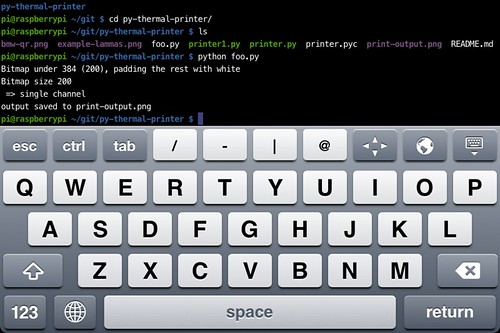
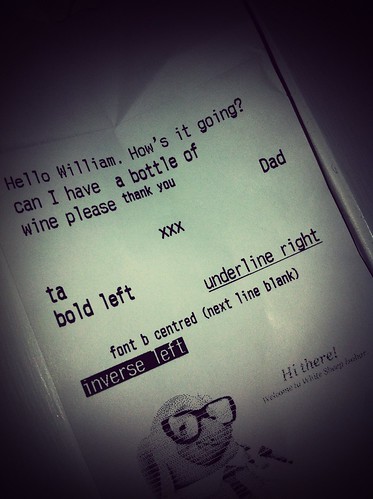
One other benefit of using SSH from a laptop or iPhone to a Pi/printer combo in the kitchen is that you can send orders to the staff:
To-do list
- Add more poems
- Get image printing to work so I can include a logo or QR code. I just got a black square with the QR code PNG I tried.
- Work out how to power printer and Pi off one power supply.
Watching Newtown unfold on Twitter was a strange experience. Like most news now, I first heard of it there, a colleague breaking the news in my timeline. I didn’t join in with RTs, and there was perhaps slightly less of the usual eager need to be the first to break the news than you sometimes get, certainly once it was clear that most of the dead were young children. Perhaps it was just too awful.
A respected journalist tweeted ‘you shouldn’t be on Twitter right now if you’re not tweeting about #Newtown’ – and I instantly felt bad about tweeting about being turned away from Pizza Express. Then I felt cross that someone was dictating the agenda for the whole of Twitter. Yes, the events were unimaginably awful – perhaps too awful to comprehend, and therefore there was, for someone so far away, some solace in the usual business of Twitter: sarcasm, funny pictures of cats and a well-refreshed Kim Wilde serenading fellow train passengers. ‘Kids in America’ – the dreadful irony didn’t even occur to me.
Part of me felt slightly detached from Newtown because I was not surprised. Have gun laws in the US changed since the last mass shooting? No? Well, there you go then. But I also felt a bit queasy watching my fellow Brits getting into arguments on Twitter with members of the NRA. I felt that it’s not our fight, the NRA are not likely to respond to foreigners telling them how to run their country. American citizens have to sort this out themselves.
So what can we do? We can share the unimaginable grief. We can wonder at some of the extraordinary acts of heroism. And we can share the experience of Dunblane and cold, hard statistical facts about deaths from handguns in countries like the United Kingdom which have far stricter gun control than the US.
Our kids have a multitude of gizmos, but still they fight over the TV; Kid A wants to watch something back off the PVR, while Kid B is playing on the Wii and Kid C wants to watch Strictly back on the iPlayer as we won’t have it on in the house and I can’t be wasting hard disk space on such flim-flammery.
We have a small Samsung TV in the small back room that just has Freeview – which apparently is not enough for today’s non-linear kids. So I decided to make use of our spare Raspberry Pi by sticking it in the unloved TV to make a media centre. This is very much a work in progress, just notes to myself to remind me what I did when I need to do it again. And if anyone else finds it useful, so much the better.
1) Our main computer is an iMac, and I followed these instructions to make an SD card with RaspBMC on it. RaspBMC is a version of the open source XBMC media centre optimised for the Raspberry Pi. I used a 4GB SanDisk card. http://www.raspbmc.com/wiki/user/os-x-linux-installation/. (I had to reformat the card in OS X disk utility as one 4GB DOS partition first as it had already been partitioned in three parts for a previous Raspberry Pi install, and it was impossible to pick the correct disk to over-write.)
2) I put the SD card in the Pi, plugged the Pi into internet by ethernet, connected to the TV by HDMI and powered it up. It updated, repartitioned, did all that groovy stuff – but when it was finally ready to rumble, the TV screen went black and the TV complained ‘mode not supported’. I half-expected this – this old Samsung LE19R86BD TV has caused problems before with its somewhat flaky HDMI support. I had to log into the Pi by SSH from the iMac to edit a config file. First, I found the IP address of the Pi by looking at the admin web page for my broadband router. Then in the OS X terminal I typed ssh pi@192.168.1.72
(your IP address will be different). The default password is ‘raspberry’. This gives you command line access to the Pi.
I then navigated to /boot/ and typed sudo nano config.txt
to edit the config file and added a line hdmi_mode=20
and chose the ‘Just Scan’ picture size mode on the Samsung remote. Then I had a picture!
2017 UPDATE ON THE SAMSUNG TV SETTINGS
If you’ve found this page by googling ‘Samsung LE19R86BD TV Raspberry Pi HDMI’ then I should note that recently (summer 2017) I found I had to use slightly different settings in the /boot/config.txt file to get a picture.
I found I got a reasonable picture (letterbox but I think aspect ratio is ok) by using
hdmi_group=1

hdmi_mode=4
and I adjusted the left and right overscan by 16. You could probably adjust the top and bottom by -16 but you may get aspect ratio problems.
3) Next I got wifi working. I have an Edimax EW-7811UN Wireless 802.11b/g/n 150Mbps Nano USB Adaptor. Setting it up is easy in RaspBMC – with it still connected by ethernet, go to the Programs tab and add a new one called ‘Network Manager’. This allows you to configure the Edimax wifi dongle easily from a keyboard.
I’ve not investigated pointing devices or remote controls yet – for now it’s working well with just an old USB keyboard.
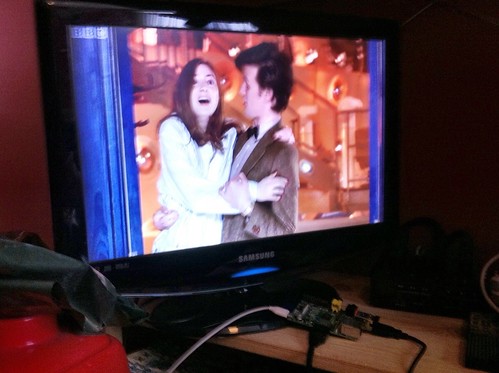
So I got the iPlayer working on an old TV using: a Raspberry Pi, a £10 USB wifi adaptor, a Kindle power adaptor, a cheap 4GB SD card and a cheap HDMI lead.
…well, what else was I going to watch after all that? Hello, Pond.