
Arduino exercise 2 – alternate pulsing lights

Having taught our Arduino to pulse a little red LED slowly on and off, and having built the circuit to go with it, we wanted to do something a bit more complex. We considered adding a buzzer, or a button to modify the light’s behaviour – but the simplest next step seemed to be to add a second light, and then get it to behave differently from the first one.

The first decision we had to make was where to start: clearly we had to change the software and the hardware, but which should we do first? I left the choice up to William – he said we should modify the wiring first. Although I feel more secure in the abstract world of code than physical electronic components, this felt right somehow.
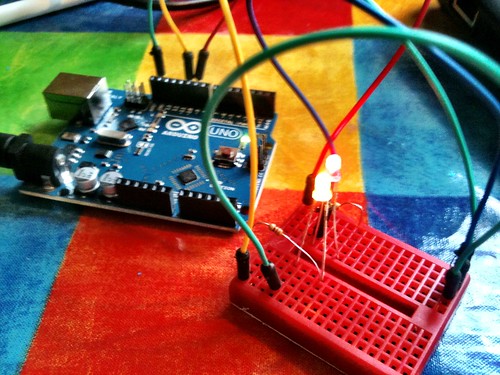
Our 2nd Arduino project - alternate red & yellow pulsing lights

So we decided to copy what we’d done with the first LED, only using a new pin on the Arduino board. In our first project we connected a red LED to pin 9, so we chose pin 10 for our yellow LED. There was going to be a bit of a problem completing the circuit, though: we know all electrical circuits have to be complete and circular, and yet the Arduino only has one GND (earth) pin. I described it to William as if we had a battery with two + terminals, but only one – terminal.

Using some vague idea of electronics I must have gained by osmosis (perhaps when I was breathing in all those solder flux fumes as a kid), I created what I confidently called a ‘ground rail’ on the breadboard. This is a common earth line that will complete both our light bulb circuits by connecting them back to the single GND pin on the Arduino.

At this point I had no idea if I was talking complete and utter homeopathy, but I ploughed on regardless.

Arduino project 2

So we rejigged our previous circuit with the red LED, taking a patch lead from the GND pin to a spare row on the breadboard, and then used another patch lead to connect it back to the LED. This spare row became our ground rail.
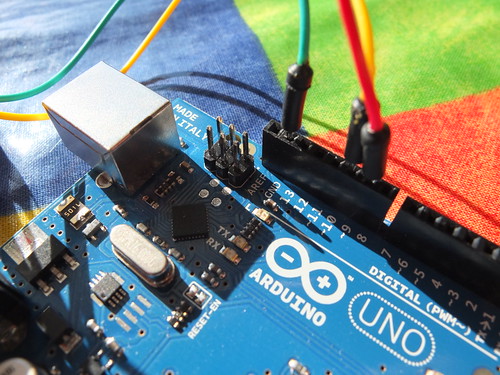
Arduino project 2

So, for our second LED, we took a jumper from pin 10, connected it to a new 330 ohm resistor, and connected that to one side of a yellow LED. The other side of the yellow LED we connected to our ground rail, to complete the circuit for the yellow light.

William was keen that the two LEDs should be next to each other, so we made the new circuit a physical mirror image on the breadboard of the first circuit.

So that’s the hardware – in theory. Just to check that I’d not gone totally off the (earth) rails, we connected this up to the power with the Arduino running the old code for one LED to see if it still worked. It did. No smoke, explosions – the red LED pulsed and the yellow LED did nothing, as you’d expect; we hadn’t told the Arduino that the yellow LED even existed, let alone what to do with it.
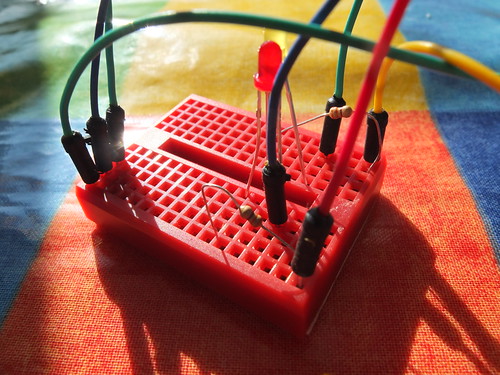
Arduino project 2

So the code… we did this in two or three steps. First we took the ‘Fade’ sample code and tweaked it so that it would control both LEDs in the same way:

/*
 Fade
 
 This example shows how to fade an LED on pin 9
 and another LED on pin 10 simultaneously
 using the analogWrite() function.
 
 */
int brightness = 0;    // how bright the LED is
int fadeAmount = 5;    // how many points to fade the LED by

void setup()  {
  // declare pin 9 and 10 to be outputs:
  pinMode(9, OUTPUT);
  pinMode(10, OUTPUT);
} 

void loop()  {
  // set the brightness of pin 9 and pin 10:
  analogWrite(9, brightness);
  analogWrite(10, brightness);
  
  // change the brightness for next time through the loop:
  brightness = brightness + fadeAmount;

  // reverse the direction of the fading at the ends of the fade: 
  if (brightness == 0 || brightness == 255) {
    fadeAmount = -fadeAmount ; 
  }     
  // wait for 30 milliseconds to see the dimming effect    
  delay(30);
}
We wanted to control each LED independently, though. So we had to alter the code so we had two variables, one to describe the brightness of the red LED, and another for the yellow, though at this stage they are both going to always have the same value:

/*
 Fade
 
 This example shows how to fade LEDs on pins 9 and 10
 using the analogWrite() function
 with separare variables for each LED
 
 */
int RedBrightness = 0;       // how bright the red LED is
int YellowBrightness = 0;    // how bright the yellow LED is
int fadeAmount = 5;          // how many points to fade the LED by

void setup()  {
  // declare pins 9 and 10 to be outputs:
  pinMode(9, OUTPUT);
  pinMode(10, OUTPUT);
} 

void loop()  {
  // set the brightness of pin 9:
  analogWrite(9, RedBrightness);
  // set the brightness of pin 10:
  analogWrite(10, YellowBrightness);

  // change the brightness for next time through the loop:
  RedBrightness = RedBrightness + fadeAmount;
  YellowBrightness = YellowBrightness + fadeAmount;
  
  // reverse the direction of the fading at the ends of the fade: 
  // and blink the internal LED on pin 13 at the fade end point
  if (RedBrightness == 0 || RedBrightness == 255) {
    fadeAmount = -fadeAmount ; 
  }     
 
 
  // wait for 30 milliseconds to see the dimming effect    
  delay(30);
}
William asked a rather perceptive question at this point: how does the Arduino know what we mean by ‘redBrightness’ and ‘yellowBrightness’? This was a great opportunity to talk about variables and how you need to declare them at the start of your code – what kind of variables are they? (integers), and what is their initial value? (0, in this case):

int RedBrightness = 0;       // how bright the red LED is
int YellowBrightness = 0;    // how bright the yellow LED is

We uploaded this to the Arduino to test we hadn’t broken anything, and it was fine: both LEDs pulsed in unison.

We then changed the code so that the yellow LED started at full brightness (255) and was gradually reduced in brightness, while the red one, as before, started dark (0) and got made brighter.

We uploaded this code – and as we’d hoped, both lights pulsed alternately:

/*
 Fade
 
 This example shows how to fade an LED on pin 9 up
 while fading a 2nd LED on pin 10 down
 using the analogWrite() function.
 
 
 */
int RedBrightness = 0;    // how bright the red LED is
int YellowBrightness = 255;    // how bright the yellow LED is
int fadeAmount = 5;    // how many points to fade the LED by

void setup()  {
  // declare pins 9, 10, to be outputs:
  pinMode(9, OUTPUT);
  pinMode(10, OUTPUT);
} 

void loop()  {
  // set the brightness of pin 9:
  analogWrite(9, RedBrightness);
  // set the brightness of pin 10:
  analogWrite(10, YellowBrightness);

  // change the brightness for next time through the loop:
  RedBrightness = RedBrightness + fadeAmount;
  YellowBrightness = YellowBrightness - fadeAmount;
  
  // reverse the direction of the fading at the ends of the fade: 
  // and blink the internal LED on pin 13 at the fade end point
  if (RedBrightness == 0 || RedBrightness == 255) {
    fadeAmount = -fadeAmount ; 
  }     
 
 
  // wait for 30 milliseconds to see the dimming effect    
  delay(30);
}

Posted in Arduino, computers, education, hardware, ICT | Tagged , | 1 Comment

Meet the Arduino

I was getting a bit fed up waiting for my Raspberry Pi to arrive, so when a colleague said he’d ordered an Arduino, I decided to get one too – even though the Arduino is more expensive and less-powerful. It turns out, though, that even the simple Arduino can be a great, inexpensive tool for teaching programming, maths and electronics, all at the same time.

Comparing Raspberry Pis and Arduinos is a bit like comparing, if you’ll forgive me, apples and oranges. The former is a tiny, cheap Linux computer, the latter is… well what is it? It’s kind of hard to explain. It’s a self-contained micro-controller that you program using a computer (any computer) and wire up to almost anything you can think of to make a little gizmo. We’re starting with lights and switches and buzzers, but ultimately I want to hook up displays and get it talking to the internet so I can make a box that tells me when the next train into town is due.

I got tired of waiting for my Raspberry Pi
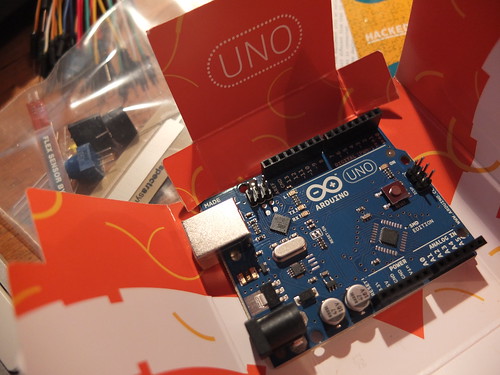
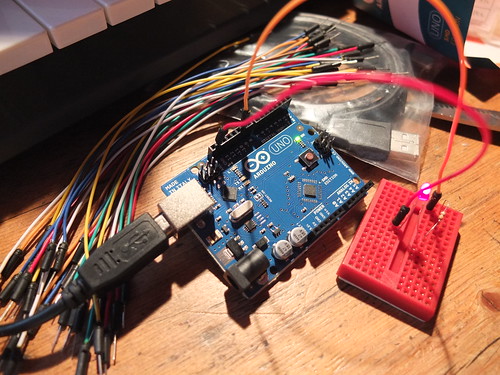
We got the Sparkfun ‘Starter Kit for Arduino’ from Proto-PIC. It arrived in less than 2 days and cost £42 including post and packing. This contains an Arduino Uno board, a breadboard, some LEDs, resistors, jumper leads, buzzer, potentiometers and more – but no instructions! I know a bit of programming, but hardly anything about electronics, so we had to dive in the deep end.

First we downloaded the Arduino software environment – you can get this for Windows, Linux and Macs. You use this to program the Arduino and tell it what to do. We plugged our new baby in to the computer by its USB lead, and uploaded the first sample bit of code included with the software – to make the onboard yellow LED (on pin 13) blink (keeping an eye out for weeping angels, of course).

Bread and butter

Next we decided to wire something up to the Arduino – we started with an external red LED which we would make light up. This required using the breadboard. Now I’ve seen breadboards before – funny plastic strips full of holes for making electronic prototypes – but I’d never used one. I had a vague idea the holes must be connected somehow underneath, but I didn’t know how. Thanks to a nameless professor, I now do:

So now I knew that the rows of holes on each side of the breadboard were wired together, allowing you to connect wires and LEDs and resistors and things without a soldering iron. I hate soldering irons, even if I am quite partial to the smell of flux. It’s a Proustian thing. I digress…

Our first Arduino circuit

So, we took a jumper wire from pin 9 on the Arduino, and plugged it into the breadboard. It seems a resistor is needed to stop too much electricity getting to the LED, so we plugged one end of a 330 ohm resistor into the same row on the breadboard, and hopped the other end of it onto a new row. On that new row, we plugged in one leg of the red LED. William noticed that LEDs are not symmetrical – one leg is longer or bows out. This is because LEDs only work when they are the right way round – they only let electricity flow through in one direction.

We then took another jumper lead from the other leg of the LED and connected it back to the GND (earth) pin on the Arduino – this completes the circuit.

Rather than just blink on and off, we decided to make this LED pulse on and off gradually, using this sample ‘Fade’ code provided with the software. It worked first time! (If you want to study the code, you need to look at this page on a computer – it gets truncated on a phone screen.)

/*
 Fade
 
 This example shows how to fade an LED on pin 9
 using the analogWrite() function.
 
 This example code is in the public domain.
 
 */
int brightness = 0;    // how bright the LED is
int fadeAmount = 5;    // how many points to fade the LED by

void setup()  {
  // declare pin 9 to be an output:
  pinMode(9, OUTPUT);
} 

void loop()  {
  // set the brightness of pin 9:
  analogWrite(9, brightness);    

  // change the brightness for next time through the loop:
  brightness = brightness + fadeAmount;

  // reverse the direction of the fading at the ends of the fade: 
  if (brightness == 0 || brightness == 255) {
    fadeAmount = -fadeAmount ; 
  }     
  // wait for 30 milliseconds to see the dimming effect    
  delay(30);
}

The obvious thing to do now was to muck around with the code to alter its behaviour. We changed the fadeAmount variable to have different values, and discovered this made it pulsate at different rates. We also found that if the fadeAmount variable wasn’t a factor of 255, it didn’t pulsate very nicely. We looked at the code to figure out why that might be. The key is in the lines:

  // reverse the direction of the fading at the ends of the fade:
  if (brightness == 0 || brightness == 255) {
    fadeAmount = -fadeAmount ;
  }

So I did a bit of reading up on the syntax of the programming language to work out what that line of code actually means in plain English: ‘if the brightness is equal to zero, OR equal to 255, then flip the direction of the fade’. The two vertical pipe lines || mean ‘or’. As our fadeAmount might not be a factor of 255, the brightness might never exactly equal 255, so we changed it to flip the direction of fade when the brightness is greater than 240:

  // reverse the direction of the fading at the ends of the fade:
  if (brightness == 0 || brightness > 240) {
    fadeAmount = -fadeAmount ;
  }

So in about an hour, William (aged 9) and I had learnt a bit about programming, a bit of maths and a little bit of electronics.

Setting the Arduino free

That’s all well and good, but the Arduino was still connected to the computer by its umbilical USB cord. It felt like the computer was still in charge, even though we were just using it to supply electricity and occasionally reprogram the board. I wanted to cut the apron strings and set the Arduino free.

The Arduino has a socket for a DC power supply, so I rummaged around in The Drawer of Many Orphaned Phones, Leads and Power Supplies and found one that fitted the bill. It’s important to ensure it doesn’t supply too many volts – between 7 and 12 is ideal, and the plug must have a positive inner pin. I found this article very helpful: http://arduino.cc/playground/Learning/WhatAdapter

We unplugged the Arduino from the computer’s USB cable, plugged the power supply in – and it worked! Quite emotional, really – our first Arduino machine making its way in the world, all on its own. *Sniff*.

Next time: how we made red and yellow LEDs pulsate alternately.

—

I’ve subsequently found this tutorial, but we had fun working this out for ourselves! http://www.sparkfun.com/tutorials/145

Posted in Arduino, children, computers, education, hardware, ICT | Tagged | Leave a comment

Library etiquette

I discovered today that in the library it is apparently acceptable to:

  • Huff and puff and mutter ‘fucking bastards’ under your breath whilst looking at the internet.
  • Consume a large packet of croissants and slurp coffee.
  • Have an insanely loud mobile phone conversation along the lines of ‘NO! NO! CALL THE LANDLINE! THE LAND LINE! HE’S LOST HIS PHONE!’
  • Have a stupidly loud stupid emergency siren ringtone.
  • Spend 5 minutes arranging your coat and bag in an unbelievably noisy way. How is it possible to make so much noise with one article of clothing?
  • In an almost empty library, sit at the computers closest to the man with his head in his hands trying to write on his laptop, and do all of the above.
Posted in Uncategorized | Tagged , | Leave a comment

Flash fiction

Flash fiction is an appealing thing. There’s no set definition, but the general idea is a very short piece of writing, perhaps 500 words or fewer, which should be written quickly.

16th of May is National Flash Fiction Day – why not have a go at writing some?

Turns out I’d already written some flash fiction in 2008, only I didn’t know that was what it was called then. I’ve tweaked and trimmed it a bit to get it to 399 words. 401 including the title:

Ugly Bloke.

What is it with beautiful women and ugly blokes?

You’ve heard that before, right – some stand-up or other? But it truly happens and it makes me crazy with fury and rage at the injustice of it.

I took the 9.23 train. Every day. I used to see this couple sitting in my carriage. He was – anyone would agree with me – an ugly bloke. His physique was nothing special. His face suggested that he’d sprung forth by some process of spontaneous generation from the lower layers of silt at the bottom of the gene pool. At least you’d think that if you saw him on his own – but he wasn’t on his own, was he?

No, he was always sitting next to his girlfriend (surely not wife) – the not-quite-domestic goddess. Late 30s, I’m guessing no kids, dripping in Boden, her long dark hair framing her perfect face and lips that would kiss. She looked a bit Nigella-ish, but less playful, less – oh I don’t know…. less obvious.

I was bewitched. Maddened. Intrigued. Every morning there they were on the 9.23, every morning I was trying to figure out exactly what she saw in him. His repartee? Nothing doing there. His wealth? The shoes and watch say no. Good in bed? That must be it. Bastard. Lucky, lucky bastard. I hate you. I wish bad things upon you. I want you out of her life. I want her for myself.

Then one day he got on the train with his arm in plaster. After that he wasn’t on the train so much. I still saw her, though, every day at 9.23, she pitched up just in time. She was what Jerry Seinfeld would call a ‘close stander’. I must have unknowingly taken the spot on the platform that she had decided long ago was her spot. I was always there long before her, and always, even if the platform was empty, she would stand unfeasibly close to me. And then when we got on the train she always turned right, I always turned left.

I never saw him on the train again. Not once.

Then last week, I was wandering home in the twilight and saw him ahead of me. Ugly bloke. Ugly bloke more dishevelled than normal, shuffling down my street with a handful of old carrier bags.

Walking up my path. Knocking on my door.

Posted in fiction, literature | 2 Comments

Farewell to Bush

Bush House
I had no idea this film was being made until today – Thomas Hannen and Owain Rich have made a beautiful sequence of images using some of the voices I and others recorded for the radio programmes John Tusa and Anna Horsbrough-Porter made about the BBC World Service leaving its longtime home in Bush House near Covent Garden in London.
millennium night
I’m biased because I worked in Bush House for about 20 years, the stones, mortar and dust of the fabric of the building are filled with a million memories, good and bad…
Head of Ducts' Office

I’ve had an emotional rollercoaster of a day and it was so wonderful to end it by being sent this beautiful little film, and so honoured to be included among so many amazing people and voices.
My last World Briefing TX

Posted in BBC, media, nostalgia, radio | Tagged , , | 1 Comment