|
 I've
always wanted
a graphics tablet, but I've never been able to afford one
- as Judith Hann would say - UNTIL NOW. I've
always wanted
a graphics tablet, but I've never been able to afford one
- as Judith Hann would say - UNTIL NOW.
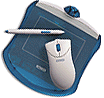
As soon as I read the MacWorld review of the Wacom
Graphire A6 graphics tablet and cordless mouse, I knew I had
to have one - a snip at around £80 including VAT.
But hang on, you say, A6??? Isn't that, like, incredibly small???
Well, yes and no. For starters, this baby costs well under
a hundred quid, what to you expect? And secondly, when you
think about it, the average mouse covers an area not much
greater than A6 and I've been using a mouse to work Illustrator
and Photoshop for long enough.
So I got the thing home (I plumped for graphite, but all the
usual lurid, dated colours are available), and booted it up.
No response. Nothing at all. Bugger.
I swiftly realised the power cable had fallen out of the back
of my hub, then all was well.
It comes with some Photoshop plug-ins - I thought they would
make the thing work, but they just seem to be PenTools - normal
plug-ins that frankly are of little use. It also comes with
the Eraser Tool plugin in case you don't already have it (I
did) - this lets you flip the pen over and use it as an eraser.
And, fragile reader, I have to tell you that this little graphics
tablet has changed my whole relationship with my computer.
I have even unplugged the hockey-puck mouse - and I was one
of the few people who liked it!

I do everything with the pen now, even navigating the Finder.
The best fun - of course - is using the airbrush in Photoshop,
but every day retouching is so much easier. It seems very
responsive to pressure, but can get sluggish if you're using
a thick brush and you're mucking around alot without saving
the file.
I've had a few more problems with Illustrator though, when
using the brush for freehand drawing. I often get a -1336
error - "Can't create a brush definition point".
Strangely this doesn't happen in 'Calligraphic' mode. It transpires
- thanks to Wacom's FAQ - that this is a known problem with
Illustrator 6, fixed in later versions. Oh well, I'd better
upgrade then.

The pen has a two-position rocker switch, and as with the
two button (plus wheel) mouse, you can define the function
of the buttons on a global or application-by-application basis.
I have had some problems setting certain functions, though,
like making the rocker activate 'Option' - possibly I'm doing
something stupid, it doesn't like my OS8.6 RevA iMac, or the
driver is faulty.
Anyhoo, a damn fine product all the same. I'd say it was worth
buying just as a replacement for a mouse.
|