UPDATED roundup of Python micro:bit resources

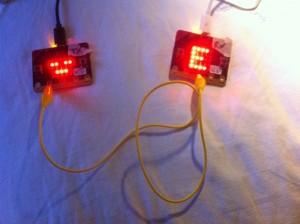
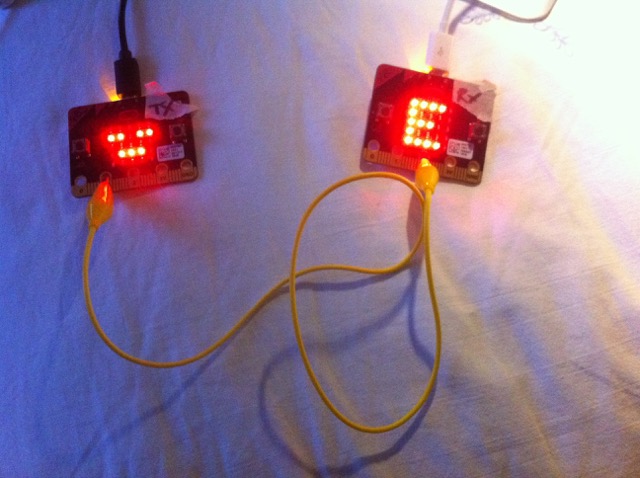
Here’s a summary of my Python resources and projects for the BBC micro:bit which you may find useful… you’ll need the Mu editor to flash some of these, especially the ones that use the radio module.

Posted in BBC, computers, education, ICT, microbit | Tagged , | Leave a comment

Happy Scratch Day!

UPDATED for 2017!

To mark Scratch Day, here are some teaching resources I made – mostly, but not all, to do with ICT / Computing:

Binary Numbers Quiz – binary to denary

Binary Numbers Quiz – denary to binary

Hexadecimal to Base 10 Revision Game

The MakeyMakey Visual Piano

Designed to use easily-accessible keys to play tunes on an 8-note scale, with keys that light up in appropriate colours.

Binary Maths Cards

Designed to work with the Computer Science Unplugged binary cards, I use this a tool when teaching and revising binary – a big hit with students who can come up and slap the interactive whiteboard to convert decimal to binary and back.

Checksum Game

Another one to get your students using on the big screen – introduce parity bits with this CS Unplugged card trick.

Bubble sort

A simple and pleasingly noisy bubble sort that allows students to see a bubble sort run in real time – and pick apart the code that makes it work.

Scaredy Squirrel Turns

I made this for a Year 2 class to help them learn about quarter turns (we didn’t do degrees in Year 2 then, though they probably do radians now). I got the children up to the board and asked questions like ‘how should we get Scaredy to face the bees?’ or ‘if Scaredy makes a half turn, what will he see?’ in a cross-curricular link with our literacy topic.

Scaredy Squirrel Game

People told me they were too young, but I wanted to get Year 2 coding, and invented this game with a familiar character to show them what Scratch could do. You have to guide Scaredy back to the safety of his tree, avoiding the various perils on the way. The results were, I think, a big success.

Posted in computers, education, ICT | Tagged | Leave a comment

Coding as a way of understanding the Monty Hall problem

The other night a maths teacher and I were sharing a few cold drinks and we fell to discussing the Monty Hall Problem.

Now, you may have heard of the Monty Hall Problem even if you don’t know it by that name. It goes like this: you are on a TV game show. There are 3 doors. Behind one door is a car, behind the other two there are goats. Assuming you want to win the car (thank you, Son B), you pick a door; the host then opens a door to reveal a goat and gives you the chance to change your choice. Should you change your choice, stick with the one you have, or does it make no difference?

This problem has infuriated me for ages because I’ve always been firmly of the opinion that it makes no difference. Which is a problem, because, in fact, if you change your choice you are TWICE as likely to win the car as if you stick with your first choice. To most people, this seems utterly mad, certainly counter-intuitive.

My maths teacher friend tried explaining it to me with glove puppets and I still didn’t really get it, so I decided the best thing was for me to write a computer simulation of it in Python. And by golly, not only does it prove him right, it also helped me understand the problem in a way I never had previously.

I think this would make a great combined maths/computing activity, because even just planning out the code helped me see the logic of the problem in a way I never had before because I was forced to confront what happens in every possible scenario. I could then see that being told what one of the wrong doors was actually changes everything – or at least it gives you a whole lot more information and that’s the key to seeing why you should change your choice.

To simplify the coding, I decided that for each game I’d always have the car behind the third door (which is door number 2, of course, Python being a zero-indexed language). I don’t think this makes any difference as long as the door choices the players make are random – an extension activity would be to rewrite the code so in every game the car is behind a different door.

This is how my code works – I’d be very happy to hear more elegant solutions, but it was when I wrote this out that the penny dropped and I finally understood the problem. Here’s how my (possibly flawed) thinking worked:

        |-----------------------|
door no.|   0   |   1   |   2   |
        |-----------------------|
        | goat  |  goat |  car  |
        |-----------------------|

I decided that I’d have two players who both pick the SAME random door in each game; player 1 would stick and player 2 would always change their choice having been ‘shown’ the door with the goat. If the car is always behind the last door, I think the sequence works like this…

If the players choose door 0, the host must open door 1 to reveal a goat, and player 2 must change their choice to door 2 – winning the car!

If the players choose door 1, the host must open door 0 to reveal a goat, and player 2 must change their choice to… door 2 – winning a car again!

If the players choose door 2 (containing the car), it doesn’t matter which of the other 2 doors the host opens, but I have decided they always open door 0 to keep things simple. In this case player 1 actually wins the car, but it’s the only way they can win it – a 1 in 3 chance. With bitter irony, player 2 has actually picked the right door first time but they will be forced to change their choice and win a goat instead – but the crucial thing is that they won in 2 out of the 3 scenarios. The changing player has a 2 in 3 chance of winning, the stick-in-the-mud has only a 1 in 3 chance.

Just sketching this out in a simple flowchart aids understanding of this problem, I don’t think any actual programming is necessary. You can see how the player who changes is twice as likely to win a car:
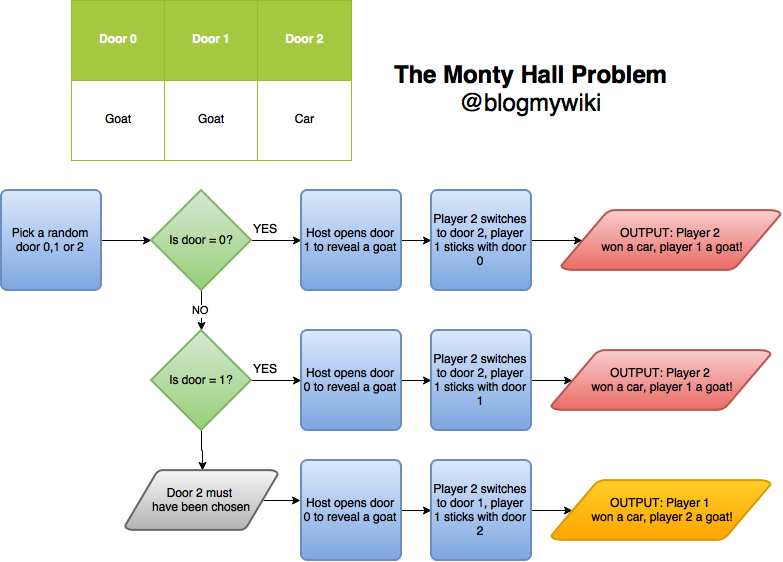
flowchart of possible simulation of Monty Hall problem

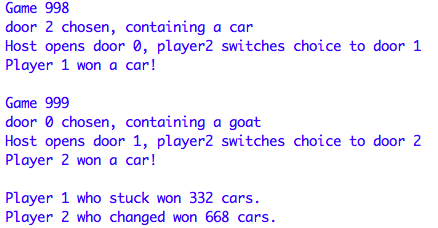
And indeed when I run this code for about 1000 games, player 2 does indeed win about twice as many cars as player 1:
A nice side-bar to this (especially as we teach in a girls’ school) is that it was a woman, Marilyn vos Savant, who proposed the correct solution to this problem, and 1000s of people with PhDs (mostly men, I bet) wrote to say she was wrong. She wasn’t.

Here’s my code, run it yourself in Python3. You can also download it here. It runs an awful lot faster in the OS X command line than it does in IDLE, and I expect I’ll find the same with Windows.
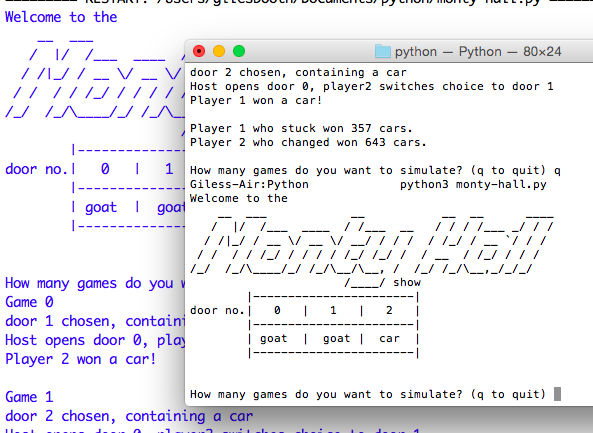
Monty Hall simulation running in OS X terminal and IDLE

If you improve it or use it in school, please let me know! Some bar charts might be nice…

# A computer simulation of the Monty Hall problem,
# a counter-intuitive logic and probability puzzle.
# by @blogmywiki - www.suppertime.co.uk/blogmywiki

print('Welcome to the\n'
'    __  ___            __           __  __      ____\n'
'   /  |/  /___  ____  / /___  __   / / / /___ _/ / /\n'
'  / /|_/ / __ \/ __ \/ __/ / / /  / /_/ / __ `/ / / \n'
' / /  / / /_/ / / / / /_/ /_/ /  / __  / /_/ / / /  \n'
'/_/  /_/\____/_/ /_/\__/\__, /  /_/ /_/\__,_/_/_/   \n'
'                      /____/ show\n'
'        |-----------------------|\n'
'door no.|   0   |   1   |   2   |\n'
'        |-----------------------|\n'
'        | goat  |  goat |  car  |\n'
'        |-----------------------|\n')

while True:

    import random

    print()
    answer = input('How many games do you want to simulate? (q to quit) ')
    if answer == "q":
        break
    else:
        tries = int(answer)

    doors = ['goat','goat','car']
    # door no. 0      1      2

    # I don't think it matters that these are not random
    # and keeping this fixed makes coding easier. 

    # Both players will pick the same door, but
    # when a door is opened with a goat behind it,
    # player1 will always stick with their 1st choice
    # whereas player2 will always change.
    # We will then keep a tally of who won more cars.

    player1_tally = 0
    player2_tally = 0

    for i in range(tries):

        chosen_door = random.randint(0,2)
        # pick a random door number between 0 and 2

        print('Game',i)
        print ('door',chosen_door,'chosen, containing a',doors[chosen_door])
        player1_choice = chosen_door
        if chosen_door == 0:
            player2_choice = 2
            print('Host opens door 1, player2 switches choice to door 2')
        elif chosen_door == 1:
            player2_choice = 2
            print('Host opens door 0, player2 switches choice to door 2')
        elif chosen_door == 2:
            player2_choice = 1
            print('Host opens door 0, player2 switches choice to door 1')

        if doors[player1_choice] == "car":
            print('Player 1 won a car!')
            player1_tally = player1_tally + 1

        if doors[player2_choice] == "car":
            print('Player 2 won a car!')
            player2_tally = player2_tally + 1

        print()

    print('Player 1 who stuck won',player1_tally,'cars.')
    print('Player 2 who changed won',player2_tally,'cars.')

And here’s a Trinket with a Python 2(ish) version of the code which you should be able to run in a web browser:

Posted in computers, education, ICT | Tagged , , , , | Leave a comment

Would you want to work at Matthew & Son?

I’ve been familiar with the 1966 Cat Stevens song ‘Matthew & Son’ since I was a youngling, and indeed back then it seemed like a grim existence working for the Man. And his son. And yet it was only the other week I stopped to think about exactly what it must have been like working for Mr Matthew. Or indeed his son. Let’s take the song line-by-line and examine the evidence.

Up at eight, you can’t be late
for Matthew & Son, he won’t wait.

Up at EIGHT? I dream of getting up at 8. My alarm goes off at 5.45, 6am if I’m having a lie-in. Matthew & Son have waited quite long enough, you laggard!

Watch them run down to platform one
And the eight-thirty train to Matthew & Son.

How I chuckle at this line as I run down to platform 3 for the 0629.

Matthew & Son, the work’s never done, there’s always something new.

Well, I’d bloody well hope for your future employment prospects that ‘the work’s never done’. And ‘always something new’ – better than the same old same old, Cat.

The files in your head, you take them to bed, you’re never ever through.
And they’ve been working all day, all day, all day!

I don’t think I ever had a job where I didn’t carry some baggage home with me. Being a BBC radio studio manager was probably as good as it gets in this regard, but even then I’d wake up screaming at 3am having dreamt that all the tape machines in S46 had turned to blancmange as the producer brings in 7 new spools of breaking news on a solo World Briefing.

There’s a five minute break and that’s all you take,
for a cup of cold coffee and a piece of cake.

I know primary school teachers who would kill for a whole FIVE MINUTE break, and us teachers like cold coffee because we can drink it in a hurry. Plus THERE’S CAKE.

He’s got people who’ve been working for fifty years
No one asks for more money cuz nobody cares
Even though they’re pretty low and their rent’s in arrears

Look on the bright side: a low-staff turnover is a GOOD sign. And clearly the job is itself reward enough! Who needs money?

Matthew & Son, Matthew & Son, Matthew & Son, Matthew & Son,
And they’ve been working all day, all day, all day!

Welcome to reality. Just be glad you’re not working all night, all night, all night. Night shifts are bloody horrible.

On balance, if Matthew & Son are hiring, I’d probably consider pinging them my CV.

Cake. I like cake.

Posted in music | 3 Comments

Logging classroom temperature on a Raspberry Pi

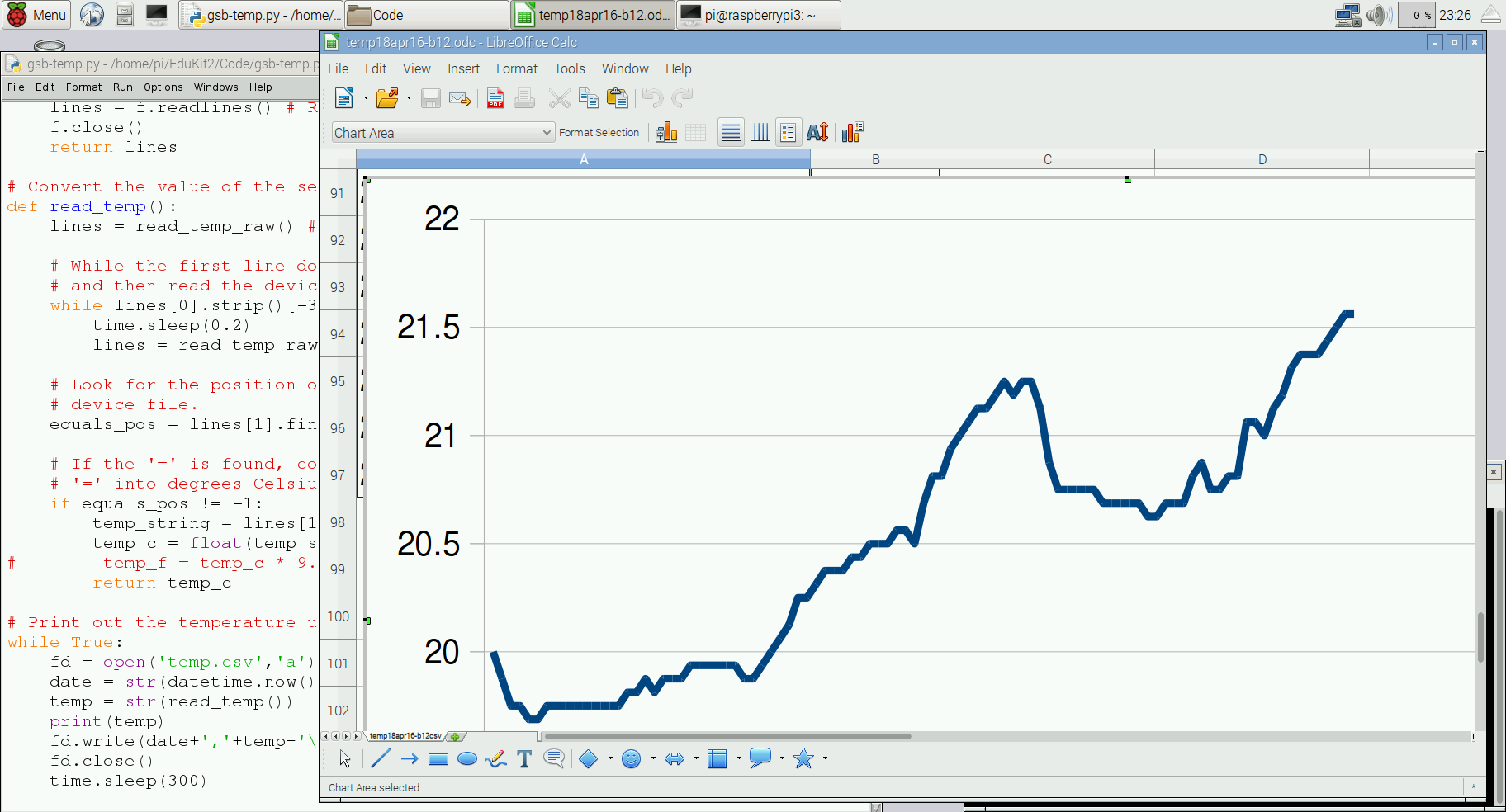
Today I logged the temperature in our ICT room as part of a wider Y7 project on data handling, spreadsheets and climate change. We’re taking real historical weather data, analysing it in Excel and making Word documents about our findings.

A simple Python script running on a Raspberry Pi logs the time and temperature every 5 minutes in a CSV file. I then opened the CSV file in Libre Office on the Pi and made a simple line chart.

The temperature sensor is part of the excellent CamJam Sensors EduKit thepihut.com/products/camjam-edukit-2-sensors – this costs an insane £7 for a tin box containing a breadboard, jumper wires, huge LEDs, a buzzer and light-dependent resistor.

See if you can spot:
a) when I turned the air-con on
b) when the classroom filled up with students
c) when those students turned their computers on
d) when lunch time was
e) when the afternoon classes arrived.

One problem I had was that the Raspberry Pi can’t get on the internet until AFTER it has logged in (it requires authorisation on a web page to join the school network), so to set the clock to roughly the right time & date I used the following command:

sudo date -s "Apr 20 09:30"

And here’s the Python 3 code, modified from the CamJam EduKit code. My new bit is at the end where it displays the temperature in the console but also writes the date/time and temperature to a file called temp.csv.

# CamJam EduKit 2 - Sensors
# Worksheet 3 - Temperature

# Import Libraries
import os
import glob
import time
from datetime import datetime

# Initialize the GPIO Pins
os.system('modprobe w1-gpio')  # Turns on the GPIO module
os.system('modprobe w1-therm') # Turns on the Temperature module

# Finds the correct device file that holds the temperature data
base_dir = '/sys/bus/w1/devices/'
device_folder = glob.glob(base_dir + '28*')[0]
device_file = device_folder + '/w1_slave'

# A function that reads the sensors data
def read_temp_raw():
    f = open(device_file, 'r') # Opens the temperature device file
    lines = f.readlines() # Returns the text
    f.close()
    return lines

# Convert the value of the sensor into a temperature
def read_temp():
    lines = read_temp_raw() # Read the temperature 'device file'

    # While the first line does not contain 'YES', wait for 0.2s
    # and then read the device file again.
    while lines[0].strip()[-3:] != 'YES':
        time.sleep(0.2)
        lines = read_temp_raw()

    # Look for the position of the '=' in the second line of the
    # device file.
    equals_pos = lines[1].find('t=')

    # If the '=' is found, convert the rest of the line after the
    # '=' into degrees Celsius, then degrees Fahrenheit
    if equals_pos != -1:
        temp_string = lines[1][equals_pos+2:]
        temp_c = float(temp_string) / 1000.0
#        temp_f = temp_c * 9.0 / 5.0 + 32.0
        return temp_c

# Print out and log the temperature until the program is stopped.
while True:
    fd = open('temp.csv','a')
    date = str(datetime.now())
    temp = str(read_temp())
    print(temp)
    fd.write(date+','+temp+'\n')
    fd.close()
    time.sleep(300)
Posted in computers, Raspberry Pi | Tagged , , | 2 Comments