Teaching Sonic Pi

I’ve been teaching my first ever lessons with Sonic Pi this week. Sonic Pi blurs the distinction between learning / teaching coding and music.

I’ve been wanting to do this since I had my world turned slightly upside down by meeting its creator Sam Aaron at BETT. Why teach coding theory with dry numbers when you could teach them with, er, banging beats? M’lud.

I had a try with Year 7 and Year 8 this week. I’m not sure how far we will get – I have some other things like HTML I really need to wrap up with Year 8, and I need to get a clearer idea of my goals with Sonic Pi. My Year 8s had not done ANY coding at all yet, the Year 7s have done some Python. I’ve set a brief multiple-choice quiz for homework about what Sonic Pi can do as an assessment took – with a free-text box for pupils to tell me what they liked and didn’t like. I also need to be firmer about getting them to save their code in our shared area so I can listen to their music.

So far, almost all of them seem to have enjoyed it, and there were some great moments of joy when they stumbled upon something new (use_synth :mod_fm, for example!).

We had a few audio glitching problems with running it on the virtual desktops in our ICT classroom (Citrix XenDesktop hosted on a VMware server) – we found some synth sounds were better than others, and it helped to have all other apps closed.

Here are my slides for my first – and possible second – lesson. In any case, it makes a great filler when other classes are away and we need to do something that’s not, currently, core to our curriculum. Though that could change…

UPDATE – Day 3 in the Sonic Pi classroom

Taught 3 lessons of Sonic Pi to Years 7 & 8 today. After watching bits of the live coding video (in the slides), some of my Year 7s now want to know if Sam Aaron is available for parties!

More VDI glitching problems on our Citrix desktops. Of course it was ok when I tested it last term, but get 23 students all logged into the the same VM Ware server, at the same time, all playing music – and it can stutter. Not sure what I can do about this… I also had a £30 Raspberry Pi hooked up to the projector, which of course played flawlessly. Hmmm…

Some pupils totally got it and are hooked, wanting to do it for several weeks in class and try it at home. We did a wee bit of live coding by turning the simple Frère Jacques melody into a canon by hitting play a second time at the right point – nimble young fingers changing the synth sound in between.

My worksheet is confusing – something I often struggle with is how to set out code. If you write out ALL the code for each step it takes up too much space, but if you do it line by line they get confused. My worksheet is a muddle of both approaches, and several students got a bit lost – needs work. I want it to be no longer than 2 sides of A4 though.

So far I think it’s enough of a hit that we’ll do at least 1 more week in Year 8 – I only see 1 Year 7 class next week, so they’ll get a bonus lesson. Some want a lunchtime Sonic Pi club – which may be a way forward!

Update to the update

I taught Sonic Pi almost every day this week. I will do a few more lessons next week and I think we’ll stop at the moment for Year 7 but may continue for Year 8 depending on whether I can plan some suitable end-points. I need to do something with numbers and arrays but haven’t worked out what yet.

The VDI causing glitching is a major issue – my pupils were good sports and stuck with it, and some of them downloaded Sonic Pi at home and excitedly tell me that they have made some ‘wicked mash-ups’ – someone younger than me might be able to explain what that means…

I also added the video of the amazing Wintergaten Marble Machine as a starter, after Sam tweeted it saying that if you could peer inside the Sonic Pi code, you’d see something like it. The classes I showed it to were mesmerised and it was a great way of settling them at the start of the lesson.

I did some straw polls to see which classes wanted more Sonic Pi next week – worst response I got was about 50%, most of the classes almost every hand went up. And it’s certainly more fun than coding a bubble sort…

I can noodle away happily with Sonic Pi for hours – you can hear some of my own live coding efforts here… the code’s on the Soundcloud page.

Posted in computers, education, ICT, music | Tagged | 6 Comments

Python activity – recreate Matisse’s Snail


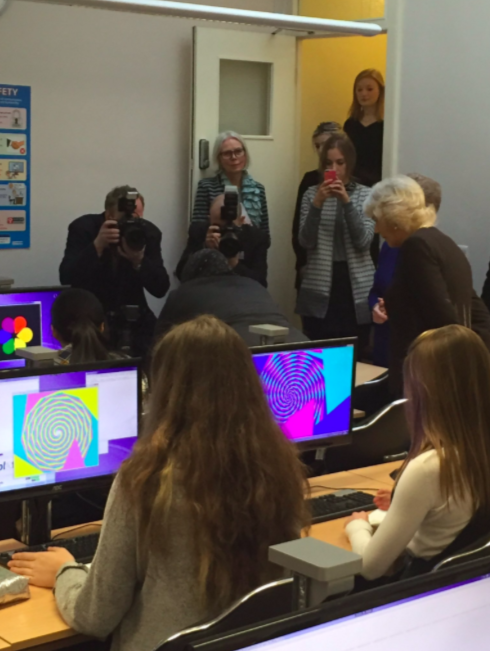
Here’s a fun lesson with Python Turtle graphics I did with my Year 7s. They had done some Python before – mainly stuff with loops, making and breaking Caesar cyphers, but I think it’s fair to say that they did not love Python… until this lesson. The shapes and colours really engaged them and I think the dry code made more sense when applied to something visual and creative.


It would also work with younger children – year 5 and 6 should be fine… and older children too!

I’ve tweaked my resource to make it more generic and offer it here as a PDF: Matisse snail Python handout

A good extension is to get them to make their own patterns by tweaking the numbers, shapes and colours – I had some amazing patterns from a Year 9 class. I’ve also made a debugging activity based on this idea which works as a standalone lesson or as a follow-on from this. Worksheet to follow!


…and this week we had a special visitor who saw some Year 11 girls who’d never done any coding before quickly getting to grips with Python to make their own art by tinkering. You’re never too old to make your own patterns!

Posted in computers, education, ICT | Tagged , , , | Leave a comment

Updated URLs for your internet radio

PilLittleRadio v2 takes shape

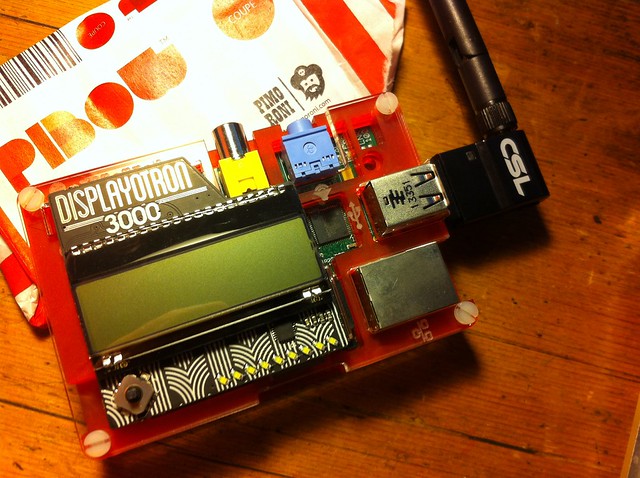
I’ve just been doing my annual maintenance on my kitchen radio – it’s an old RaspberryPi with a lovely Pimoroni Displayotron3000, and it runs their lovely radio script. (You configure it by editing the dot3k.cfg file in ~/Pimoroni/displayotron/dot3k/advanced)

I’ve made lots of Raspberry Pi radios, including one you can control from your phone or tablet. Read more about them here: http://www.suppertime.co.uk/blogmywiki/piradio/

I was moved to tinker with it because of recent improvements to the analogue audio output of the standard audio jack – see https://www.raspberrypi.org/forums/viewtopic.php?f=29&t=136445 for more details on that.

I found a few stations (NPR, ResonanceFM and MEATtransmission) have changed their URLs since I last tinkered, so here’s my current list, in case anyone finds it useful for a RaspberryPi radio or other internet radio project.

Though you only really need the first station on this list.

[Radio Stations]
fip128 = fip,http://icecast.radiofrance.fr/fip-midfi.mp3
BBC1 = BBC Radio 1,http://bbcmedia.ic.llnwd.net/stream/bbcmedia_radio1_mf_p
BBC1x = BBC Radio1xtra,http://bbcmedia.ic.llnwd.net/stream/bbcmedia_radio1xtra_mf_p
BBC2 = BBC Radio 2,http://bbcmedia.ic.llnwd.net/stream/bbcmedia_radio2_mf_p
BBC3 = BBC Radio 3,http://bbcmedia.ic.llnwd.net/stream/bbcmedia_radio3_mf_p
BBC4fm = BBC Radio 4FM,http://bbcmedia.ic.llnwd.net/stream/bbcmedia_radio4fm_mf_p
BBC4lw = BBC Radio 4LW,http://bbcmedia.ic.llnwd.net/stream/bbcmedia_radio4lw_mf_p
BBC4x = BBC Radio 4 Extra,http://bbcmedia.ic.llnwd.net/stream/bbcmedia_radio4extra_mf_p
BBC5 = BBC Five Live,http://bbcmedia.ic.llnwd.net/stream/bbcmedia_radio5live_mf_p
BBC6 = BBC 6Music,http://bbcmedia.ic.llnwd.net/stream/bbcmedia_6music_mf_p
einws = BBC WS News, http://bbcwssc.ic.llnwd.net/stream/bbcwssc_mp1_ws-einws
npr = NPR,http://nprdmp-live01-mp3.akacast.akamaistream.net/7/998/364916/v1/npr.akacast.akam$
meat = MEATransMISSION,http://uk2.internet-radio.com:8118/
monocle = Monocle M24,http://radio.monocle.com/live
resonance = ResonanceFM,http://stream.resonance.fm:8000/resonance
purple = Purple Radio,http://uk1-pn.webcast-server.net:8184/
rte1 = RTE Radio 1,http://icecast2.rte.ie/radio1
share = Share Radio,http://tx.sharp-stream.com/icecast.php?i=shareradiorpmobilehigh.mp3
Posted in radio, Raspbian | Tagged , , , , | 2 Comments

MicroBit Happy Plant

I had a go at making Geekfish’s Happy Plant project myself – this aims to tell you if your plant is thirsty using a BBC MicroBit, a resistor, some nails and a bit of Python code. I edited the code slightly, as I had a 1.5K resistor rather than a 1.2K one, so I changed line 4 to KNOWN_RES = 1500

Happy Plant

I flashed the Python code to the MicroBit using the totes awesome Mu Python editor. I kind of guessed how the wiring should work by squinting at Geekfish’s video – I came up with this. It hasn’t blown up my MicroBit yet…

Happy Plant circuit diagram

Posted in computers, education | Tagged , , | Leave a comment

3 ways of making sound with the BBC MicroBit

Games on the MicroBit are way more fun when they make noise.

Here are 3 ways of making sound that I’ve tried with things I had lying around the house, in ascending order of usefulness / awesomeness:

ways of making sound on MicroBit

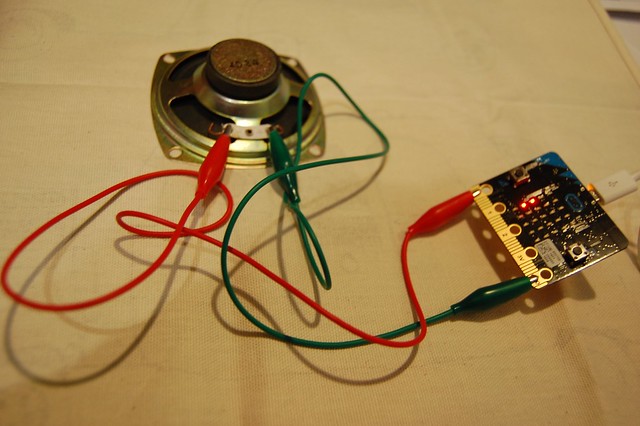
1) A loudspeaker. I bought this one from Pimoroni for a Raspberry Pi radio project that I’ve not yet completed. I attached it using crocodile clips from a MakeyMakey kit to pins 0 and GND on the MicroBit and ran some Python code on the MicroBit like this.

Pros: loudspeakers are quite easy to find.
Cons: fragile, highly magnetic – and very quiet!

ways of making sound on MicroBit

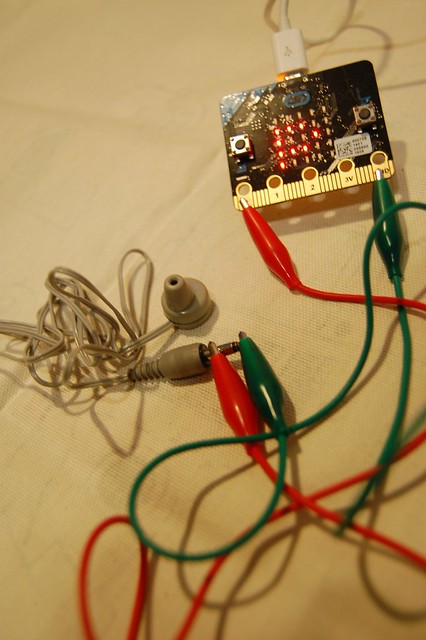
2) An old earpiece. No idea where this came from – an ancient radio perhaps. I attached the crocodile clips to the 2 pins on its jack plug.

Pros: Very loud. Cheap.
Cons: TOO loud. Do not place anywhere near your ear canal.

ways of making sound on MicroBit

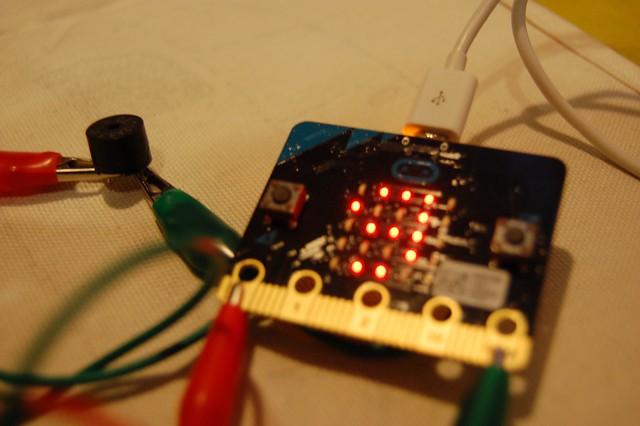
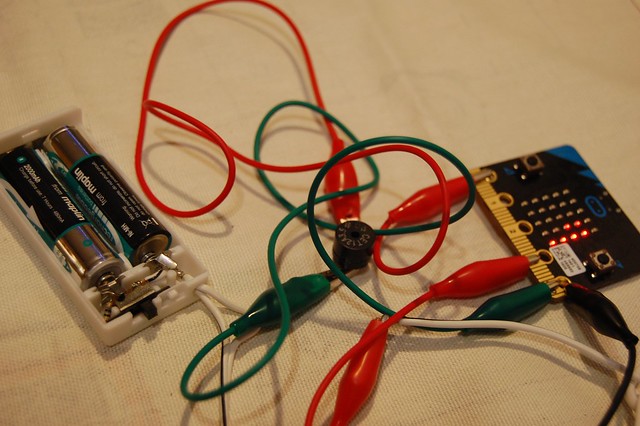
3) A buzzer thingy from an Arduino kit. Not sure what its proper name is, but I had a couple of these as one came with a RaspberryPi CamJam kit too.

Pros: Very loud, cheap, tiny.
Cons: None!

So the buzzer is the way to go. I want to try a buzzer from a musical birthday card, but I can’t lay my hands on one at the moment – I have a hunch they would be really good too.

home-made battery pack

I also made my own battery pack – 2 AA batteries in a holder that I took off some broken Christmas lights – attach the + side to the 3v terminal on the MicroBit, and – to the GND terminal, and I have a switchable, portable power supply for making self-contained MicroBit projects.

Posted in Uncategorized | Tagged , | 1 Comment