Finally made myself a bootable USB pen drive. I’d been hankering after doing this for a while, more as an end in itself than anything. But having done it, I think I might find this rather useful.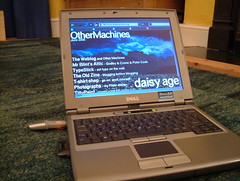
Here’s the hardware I used:
- Dell Latitide D400 laptop with WindowsXP
- Kingston 256MB USB memory stick
- Cisco Aironet 350 wifi PCMCIA card
And here’s what I ended up with:
A memory stick that will allow me to boot a heavily locked-down Windows laptop into Linux for wireless internet access and more.
Here’s how I did it:
Basically followed the instructions at www.althack.com with a few changes.
I didn’t bother with the HP software to reformat memory sticks, I just deleted everything off mine in Windows. (The HP software requires you to be an admin in XP to run, and I’m not.)
Then, also in Windows, I downloaded the dsl-embedded.zip version of Damn Small Linux and extracted it to a folder on my hard drive. I copied all these files to the USB stick in Windows.
I then downloaded a thing called syslinux, and again extracted all the files to a folder on my hard drive. Got up a Windows command line (Run… cmd) and navigated to the win32 folder inside the syslinux folder. I then typed
syslinux -f E:
where E: was the letter of my USB pen drive. Then typed
exit
to close the command line interface.
Then I rebooted my laptop, went into the BIOS settings at startup (f2) and changed the boot order so USB was above the Hard Disk Drive, restarted and I was off and away. It booted pretty quickly and even got itself on the internet via an unsecured wireless access point, without me even asking!
It’s got Firefox, image viewers, FTP software, some useful tools, even a web server. It’s pretty quick and perfectly usable for web-browsing.
So far I can only get the screen to run at 800×600 on the default settings, but have been able to run at 1024×768 by specifying
dsl xsetup
after pressing F2 at boot time.