BBC1 Continuity Announcer Misses Trick

Just watched Who Do You Think You Are, in which Doctor Who actor David Tennant traced his family history and was a bit uncomfortable to find that some of his ancestors were Ulster Orangemen.

Sadly it wasn’t back-announced with the words “And sticking with the theme of orange men, in next week’s programme, David Dickinson traces his roots…”

Posted in Uncategorized | Leave a comment

The sun sinks slowly in the West

Just got the new Howies catalogue. They’ve thrown in a little book of things to do in Wales, called ‘Go Wales’.

Again, half of me wants to hug them, half of me wants to throw up.

Take this little footnote:

“You get more day for your money round here. The sun sets almost thirty minutes later than in the east.”

I’m guessing it also rises thirty minutes later as well.

Posted in Uncategorized | 2 Comments

The horror! The horror!

As part of my job I often have to go crawling under desks used by journalists, some of them used by journalists 24 hours a day.

Here are some of the things I’ve recently found in such places:

* 53p in change
* 3 Wacom graphics tablets, covered in a thick layer of grease and dust
* 2 pens for said graphics tablets
* 17 biros
* 3 pencils
* 5 post-it notes containing once-important phone messages
* fluff
* dirty knives, forks and spoons, encrusted with ancient and decaying foodstuffs
* a hair-grip
* 2 remote controls for televsions or set-top boxes

Posted in Uncategorized | 2 Comments

Are you being professionally refreshed?

Walking down the street the other day, I saw an advert on the back of a bus for a new brand of water.

“WATER JUST TURNED PROFESSIONAL” ran the slogan.

I was grateful for this intelligence, as it had never occured to me before that the water I normally use for cooking and drinking might be unprofessional. In fact, I’ve been a fool. Using amateur water for my thirst-quenching, boiling and steaming needs.

I then got to the railway station where I was confronted by a huge advert for yet another brand of drink – not water, but a sports drink. According to the billboard, it’s UNIQUELY ENGINEERED TO QUENCH YOUR THIRST.

Until then I’d always thought that dull old H20 was UNIQUELY ENGINEERED to do that. Silly me.

Posted in Uncategorized | Leave a comment

Bootable USB memory stick

Finally made myself a bootable USB pen drive. I’d been hankering after doing this for a while, more as an end in itself than anything. But having done it, I think I might find this rather useful.Linux on a USB pen drive
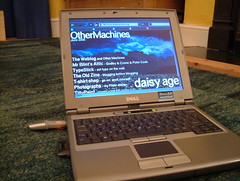
Here’s the hardware I used:
- Dell Latitide D400 laptop with WindowsXP
- Kingston 256MB USB memory stick
- Cisco Aironet 350 wifi PCMCIA card

And here’s what I ended up with:
A memory stick that will allow me to boot a heavily locked-down Windows laptop into Linux for wireless internet access and more.

Here’s how I did it:
Basically followed the instructions at www.althack.com with a few changes.
I didn’t bother with the HP software to reformat memory sticks, I just deleted everything off mine in Windows. (The HP software requires you to be an admin in XP to run, and I’m not.)
Then, also in Windows, I downloaded the dsl-embedded.zip version of Damn Small Linux and extracted it to a folder on my hard drive. I copied all these files to the USB stick in Windows.
I then downloaded a thing called syslinux, and again extracted all the files to a folder on my hard drive. Got up a Windows command line (Run… cmd) and navigated to the win32 folder inside the syslinux folder. I then typed
syslinux -f E:
where E: was the letter of my USB pen drive. Then typed
exit
to close the command line interface.

Then I rebooted my laptop, went into the BIOS settings at startup (f2) and changed the boot order so USB was above the Hard Disk Drive, restarted and I was off and away. It booted pretty quickly and even got itself on the internet via an unsecured wireless access point, without me even asking!

It’s got Firefox, image viewers, FTP software, some useful tools, even a web server. It’s pretty quick and perfectly usable for web-browsing.

So far I can only get the screen to run at 800×600 on the default settings, but have been able to run at 1024×768 by specifying
dsl xsetup
after pressing F2 at boot time.

Posted in Uncategorized | 1 Comment