Day 8 in the Raspberry Pi house

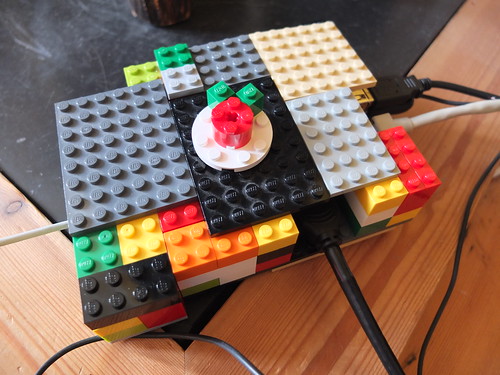
Lego Raspberry Pi case

My boys made a cool Lego case for the Raspberry Pi – it has holes for the USB, HDMI, ethernet and power leads – and the coolest rotating Raspberry Pi logo on top. It’s not perfect but it does the job and was built with scant resources and negotiation with little sister to get some plates out of her house that she had made.

On day 7 I discovered that to get the audio to work you need to type
sudo modprobe snd_bcm2835
at the command line before running startx. You seem to need to do this every time you start the RasPi up. Odd.

I installed VLC and played an MP3 (‘My First Love’ by The Paper Aeroplanes, of course) and even played a simple bit of video. Sound came out of the TV via HMDI and while not CD quality, it was just fine.

Posted in computers, Debian, hardware, Linux, Raspberry Pi | Tagged | 2 Comments

Green Continuity

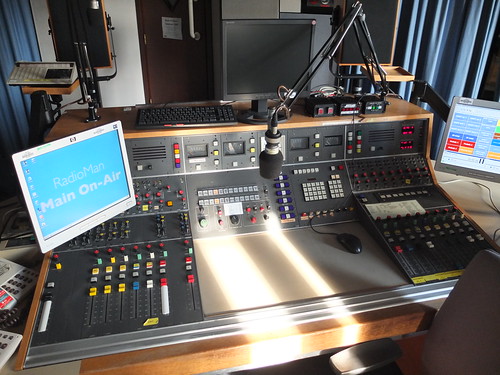
Con1A - Green Continuity

Green Con was where the main World Service English language network was put on air. The announcer sat on this side, and the Studio Manager sat on the other side of the glass on the right (now a TV studio) with an identical desk and they put live studios on air and played out pre-recorded programmes on tape. I used to love doing Green con. I was being paid to listen to the radio, something I did anyway. Then they got rid of the SM and the announcers played tapes and CDs and digital things themselves. And then they got rid of the announcers and it was all automated, just like the Human League predicted in 1980 in their song WXJL Tonight.

All the networks had colours, and when they ran out of colours they had ‘bars’ added, so there was ‘brown’ (Arabic) and ‘brown bars’ (I forget what that was). Green was English. They then ran out of colours again and went for textures, so there was ‘velvet bars’. (I may have made that last one up.)

I saw this one coming… I was once the SM sitting on the other side of the glass playing the programme tapes. The announcer was sat here. It was the John Peel Show, the last record was ‘Voodoo Chile’ by Jimi Hendrix. The announcer in question wasn’t quite au fait with any kind of music post-Mozart, and as I suspected he would he do, he back-announced the programme with the immortal words “that was Mr Jimi Hendrix, with Voodoo Chilly.”

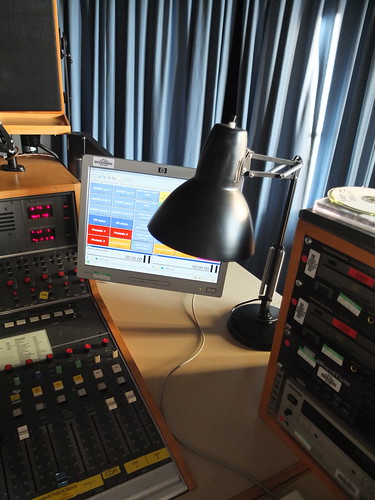
Con1A - Green Con

Once the pips (GTS – Greenwich Time Signal) failed to appear and the announcer – I think it was Michael Powles – improvised by hitting the lamp with his pen in time with the pips. Genius.

Posted in BBC, media, nostalgia, radio | Tagged , , | 1 Comment

I know what Twitter is like

It’s like the Noise in the Chaos Walking trilogy by Patrick Ness. It’s like being able to hear everyone’s thoughts all the time whether you want to or not. Or like Bruno Ganz in Wings of Desire.

It’s nice when it stops.

Posted in Uncategorized | Tagged | Leave a comment

Days 4 & 5 with Raspberry Pi

On Day 4 I broke my Pi! I tried to install some Google calendar thing and then my Pi wouldn’t get past the ‘startx’ command – it turned out that the install had totally filled the disk space on the flash card, meaning the Pi could not run a windowed environment. I tried to clear it from the command line but gave up and wiped my card and made a new one.

On day 5 I realised that although I had a 4GB SD card, I was only using 2GB of it, as I wrote a 2GB disk image to it. I made a live CD of Gparted which I booted a laptop from, and used that to make my EXT4 Linux partition on my RasPi SD card as big as possible, Works a treat and I now have 2.2GB free disk space – which suggests I only had 0.2 GB free before. No wonder it fell over when I started installing more software!

I’m back up and running now. And itching to try putting XBMC on a RasPi to make a very cheap media centre – I could have one in the back of every TV.

Posted in computers, Debian, hardware, Linux, operating systems, Raspberry Pi | Tagged | Leave a comment

Raspberry Pi day 3: Using the right disk image.

Day 3 in the Raspberry Pi House

I’ve realised the version of Raspberry Pi Debian Squeeze I’d been using was out-of-date. There are two problems with the Mac OS X script for making RasPi SD cards called RasPiWrite:

  • It downloads out-of-date images (certainly for Debian)
  • There’s a bug in it which means that the option to use your own disk image you’ve downloaded doesn’t work. I wasted ages on this before I twigged.

I even tried editing the Python script of RasPiWrite to force it to use a current image, but I couldn’t get it to work.

So, if you have a Mac as far as I can see, at the moment you have 2 options to make your RasPi SD card:

  • Use the slightly scary command line instructions here: http://elinux.org/RPi_Easy_SD_Card_Setup
    You need to be really careful with this though, because if you type the wrong thing in you can wipe your hard drive. Oopsy. And beware that ‘/dev/disk1s1 => /dev/rdisk1′ isn’t something you type, it’s something you work out in your head.
  • Use a Windows box.

I did the former (on my second-best Mac), and it worked. My terminal session looked something like this:

Giles-Booths-IdeaPad:~ gilesbooth$ diskutil unmount /dev/disk1s1
Volume NO NAME on disk1s1 unmounted
Giles-Booths-IdeaPad:~ gilesbooth$ dd bs=1m if=~/Downloads/debian6-19-04-2012/debian6-19-04-2012.img of=/dev/rdisk1
dd: /dev/rdisk1: Invalid argument
1859+1 records in
1859+0 records out
1949302784 bytes transferred in 321.937141 secs (6054917 bytes/sec)
Giles-Booths-IdeaPad:~ gilesbooth$ diskutil eject /dev/rdisk1
Disk /dev/rdisk1 ejected

Your command will almost certainly be different, so don’t cut and paste this! It takes quite a while to write to the card, so don’t worry if it looks like nothing is happening, and that error message didn’t seem to cause any problems.

My new card booted ok after a while – lo! I have RaspberryPi wallpaper and programming tools, education tools like Scratch, though the screen is in a weird 1824 x 984 resolution on my TV (which doesn’t fill the screen), rather than the better 1920 x 1080 which I’d had before. And you still have to create a root password using ‘sudo passwd root’ in the terminal before you can install any applications using Aptitude.

I’ve been mulling over some possible uses for my RasPi:

  • It would make an awesome partner to my Arduino.
  • It could be left on all the time displaying my Google calendar for the day or week plus the time of my next train on a TV’s AV or HDMI input.
  • Driving a display at work with relevant tweets or headines.

Posted in computers, Debian, hardware, Linux, operating systems, Raspberry Pi | Tagged | 5 Comments