Twinkle, twinkle

Sometimes I get bored reading the same stories and singing the same lullabies to my children. So I substitute lines from popular songs. Ten points if you can spot the artists at work here:

Twinkle, twinkle little star
How I wonder what you are
Up above the earth so high
Like Jeff Goldblum in the fly
Twinkle, twinkle little star
It’s not quite a Jaguar.

Posted in children, family life | 2 Comments

Ha ha ha he he he

I’m still not quite sure about Ashes to Ashes, but as I had an idea for a prequel to Life on Mars - set in the 1960s, to be called The Laughing Gnome - I was pleased to see lots of, well, laughing gnomes in last night’s episode.

Posted in TV | Leave a comment

Big fat hard drive in a 700 MHz G4 iMac

Conventional wisdom says that any G4 iMac slower than 1 GHz cannot work with a hard drive bigger than 120 GB. But they were selling 320GB IDE drives in Maplin for only £59.99 and it seemed silly to pay ten or twenty quid less for a fraction of the storage – anyhoo if it didn’t work I could always bung the big drive in my USB/Firewire caddy and use it for backing up the backups of my photos…

So I opened up the iMac again, inserted the drive, had considerably more trouble getting it back together this time but got there. Expecting nothing (I thought I’d broken the IDE cable aside from the fact that most web sites said this would not work) I powered up. Bing! Flashing folder, as expected.

Inserted Panther install disc – installer ran but couldn’t find a hard drive. Well fair enough, it’s factory fresh and not formatted, so I used Disk Utility on the Panther install disc to format it as Mac OS X Journalled.

But the installer still wouldn’t install – it found the drive but it had a red warning triangle next to it and the words “You cannot install Mac OS X on this volume. You cannot start your computer from this volume”.

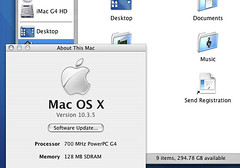
Game over, I thought. Either the IDE cable is broken or – as people say – the drive is just too big for an old Mac. But before I gave up I had a word with Mr Google (thank you Jamie Oliver) and found this page which told me to give it a reboot. And by jove, he’s right. It’s insane, but he’s right. After a swift kick the installer happily ran and here I am typing this on an ancient 700 MHz G4 iMac that cannot possibly work with a hard drive larger than 120 GB, and yet I have 300 GB free… ah so many things to try… more memory, video editing, installing a DVD burner, keeping all my MP3s, getting all my photos off my PowerBook which has run out of disk space…

look ma! 300GB free!

Posted in Apple, computers, hardware, lowendmac, MacOS X, operating systems, thrift | 4 Comments

Repairing a G4 ‘Anglepoise’ iMac

My son’s school was chucking out a faulty 700 MHz G4 Anglepoise iMac – apprently it had an intermittant fault where the hard drive clicked and it wouldn’t boot. Of course I couldn’t bear to see this become land-fill so I brought it home to my Macintosh Sanctuary.

At first it seemed fine but whilst installing OS X, the thing died. Click, click, click. All I could do was get it to boot into Open Firmware – it wouldn’t even eject the CD-ROM. I was convinced I’d killed it, but a couple of bright sparks at work suggested that the hard drive might have just finally kicked the bucket. As it shares its IDE interface with the CD-ROM drive this might also explain why the CD wouldn’t eject. Armed with some instructions from XLER8YOURMAC, size 10 and 15 Torx (star-shaped) screwdrivers and an old 4GB Bondi Blue iMac hard drive, I explored.

I actually found the whole thing easier than that article suggested. First using a small cross-pointed screwdriver you undo the base plate to get at the user-servicable parts – a memory slot and Airport card slot:
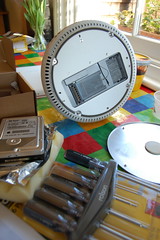
user servicable parts

Then the big Torx T15 screwdriver comes into play – undo the 4 Torx screws and pull the whole base – including the white plastic bit where the ports are. Be gentle but firm as you are unplugging connectors as you do this.
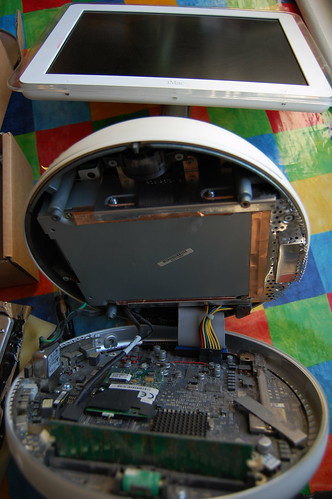
prising open

At this point you can swap its internal memory card if you like, but I was interested in the grey drive assembly. I disconnected its IDE connector on the motherboard and unclipped the 2 cables clamped to its right. Then I used the T10 Torx screwdriver to remove the 6 screws holding the drive assembly in place (click on photo to see notes):
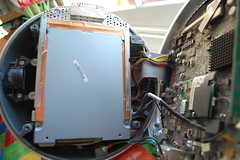
drive assembly

I then pulled the drive assembly down and towards me.
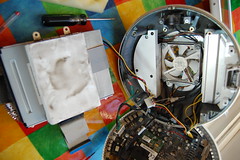
fan and gubbins

I then removed the IDE and power connectors from the hard drive, peeled the strange white plastic wrapper off and removed the IDE drive from its caddy using a Torx screwdriver.
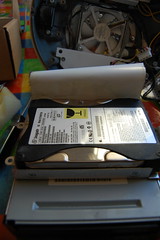
the dead hard drive

I replaced it with a 4 GB hard drive from my original 233 MHz Bondi Blue iMac – one tenth the size of the one I removed but this was a temporary measure to prove that this was the problem before I shell out some real money on an 80GB drive. I put it all back together, forgetting the thermal paste for now, and turned it on:
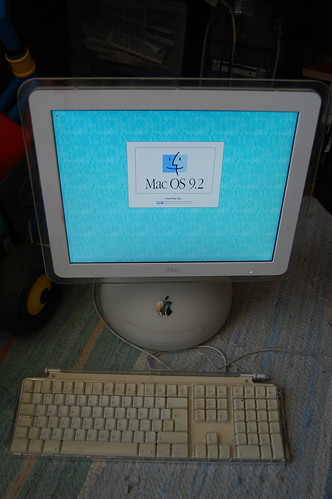
Never so pleased to see OS 9!

I’ve never been so pleased to see the OS 9 splash screen! That old iMac hard drive must have been confused though – it fell asleep in a 233 MHz CRT G3 Bondi Blue iMac and woke up in a 700 MHz LCD G4 anglepoise iMac… I never liked the G4 iMac when it came out, but now I have one I think it’s a great machine. And easier to get inside than the Bondi Blue beastie…

Posted in Apple, lowendmac, thrift | 4 Comments

Pass the paracetamol

I’m not sure which depresses me more; this, or this?

The former shows how many colour printers secretly print yellow dots to tell The Man the serial number of your printer and the time and date of printing.

In the latter a journalist called Michael Henderson kicks John Peel’s rotting corpse 4 years after his death. Way to go. Next week I’m sure he’ll be pissing all over Jeff Buckley (“HE NEVER GREW UP!”) and taking a dump on John Smith (“HE STAGED HIS OWN DEATH TO AVOID THE TOUGH DECISIONS OF GOVERNMENT!”). Tosser.

Posted in grief, newspapers | 1 Comment