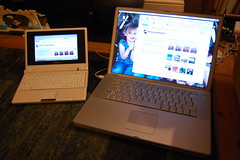
OR: NEVER MIND THE $100 LAPTOP, GET A LOAD OF THE £200 LAPTOP!
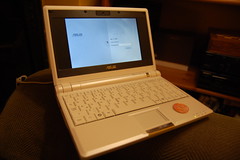 I’ve had my Asus eee PC for a couple of days now, and can set some thoughts down… as you know this is a tiny £200 sub-notebook computer, that almost perfectly fits my long-held dream of a tiny laptop with no hard drive which would boot quickly enough to allow me to write something on a short train journey, let me get on the net using wifi, write that coruscating best-seller!
It really does fulfill my dream. It boots in seconds and wakes from sleep even faster. The screen is a mere 800×480 pixels but it’s very sharp – quite high resolution – and most web sites look just fine. Quite a lot of scrolling required but BBC News and Flickr work ok. You can hook up an external monitor via VGA and get some pretty huge resolutions – I did this at work today and it was hard to believe that this tiny box was producing a great big picture.
The keyboard is a bit clackety, but I’m typing this on it now without too much trouble. The trackpad is surprisingly good – not up to my PowerBook’s but it does have a scroll strip on the right which is almost as good as Apple’s 2-fingered salute. Frankly I thought the click button was faulty until it dawned on me that it does left or right click depending on which side you press – double-tapping the trackpad is easier for a left-click.
It’s got 3 USB 2.0 ports, which is one more than my PowerBook that cost 10 times as much. It’s got an ethernet socket, a built-in web cam and stereo speakers and headphone and mic sockets – along with a built-in mic at the front just underneath. There’s also a slot for additional memory via SD cards, which I’ll need. My unit has 4GB of flash storage, much of which is taken up with the OS and 512MB of RAM.
Although you can install WindowsXP on it, it comes pre-installed with a special version of Xandros Linux. There’s a huge range of useful open source software included – Firefox, of course – which you can add an FTP plugin to. OpenOffice for word processing and whatnot. The media players do a nice job of playing MP3s and have coped with the few various video files I’ve chucked at them. There’s also Skype – not open source but potentially makes this device worth the money on it’s own. I’ve got the Skype 2.0 beta running using the web cam – this machine is so tiny you could just leave it on in the kitchen and use it for phone calls and checking the news headlines and train times.
Of course as a Linux machine you’re a bit limited in what peripherals you can use – no problems with my Kingston memory stick but when I plugged my Nikon D40 camera in (without much hope) oddly it mounted a drive called ‘D40′ but couldn’t see anything on it. No great loss as I can plug the Nikon’s SD card straight into the eeePC’s internal card slot – in fact this little gizmo means that if I carry it with my camera I can file pictures from anywhere I can snaffle some WiFi connectivity.
But peripherals are hardly the point – a memory stick goes a long way. You can even boot off a USB keyring if you want to try an alternate Linux flavour without trashing the default configuration. One mad fool has even got MacOS X running on one…
There are a few niggles so far – the WiFi is a bit flaky at first and nowhere near as easy to set up as a Nintendo DS (which is my gold-standard for simple WiFi configuration – those guys make Apple look sloppy!) – a couple of times I’ve just bitten the bullet and rebooted, but that itself is so quick and Firefox opens all its tabs just where you were.
Other oddities are the fact that this is a single user Linux – amazingly you cannot have multiple accounts without installing another Linux distro, which I don’t want to do. This is a pity and tragically means that I can’t let the kids have the eeePC after all, what with the lack of parental controls as well. Oh well.
Also they seem to have stripped out the option to set the clock from an NTP server, which is very very odd, especially as it’s mentioned in one of the help pages. Annoying thing for them to have dropped – quite handy when you’re out and about, to get the right time off the interweb!
But all in all a lovely dream machine… it is, as Stephen Fry would say, my mother, my lover, my strumpet of the boudoir. If only I’d managed to get one in black…

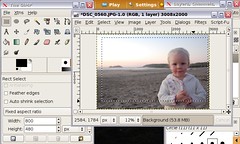 The Asus eeePC is great for the photographer on the hoof – especially if your camera uses SD cards which you can just pop in the slot in the side. The default image viewers are okay but leave a bit to be desired if you want to do anything slightly unusual… I tried a couple of others such as Google’s Picassa and Digikam but they weren’t quite for me either… specifically I wanted to be able to crop images to a fixed aspect ratio for making wallpaper. I was pretty sure that The Gimp would do the trick – using it is easy for anyone familiar with Photoshop. I had a look at this interesting post on eeePC tools for photographers – worth noting that to install it I had to press ctrl-alt-T to get a terminal and then type