People are strange

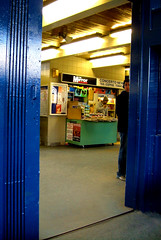
concerto newsThis morning I was queuing for a train ticket for Charing Cross. There were two people in front of me, both with fairly complicated queries. The ticket machines were free but I had about 5 minutes before my train was due and I prefer buying tickets from human beings.

A man pitches up behind me. He looks like he wants to get the Cannon Street train which is just pulling in. Now, if he’d said “arghhh, there’s my train!” I might have let him queue jump. If he’d said “there’s my bloody train” I might have given way. But his opening gambit was this: he said “Fuck you! FUCK YOU ALL! There’s my FUCKING train!”.

So I didn’t move, he missed his train and the next one was ten minutes late.

Posted in commuting | 1 Comment

I’m not a green toothbrush

DSCF1894.JPGI’m no ‘green champion’ – I do compost all appropriate kitchen waste and I recycle paper, but have been known to throw tin cans, bottles and plastic in the bin.

But this toothbrush makes me mad. It contains a non-replaceable normal AAA Duracell battery. You can’t replace it because if you try, the thing disintegrates inside and won’t work any more.

We salvaged the motor though and William made an aeroplane out of it. Or a sonic-screwdriver. We’re not sure. But it buzzes and spins and he loves it.

Posted in Uncategorized | Leave a comment

Doctor Who by Dennis Potter

scarecrowDon’t get me wrong – the current episodes of Doctor Who (Human Nature) are just the best ever, and I think David Tennant is the best Doctor ever. But in Doctor Who Confidential over on BBC Three, David Tennant says that scarecrows are such an obvious idea that it’s odd they’ve not been used before for their spooky potential.

Well they have – take for example The Singing Detective by Dennis Potter. The screen-grab here is from episode three, in which the young Philip Marlowe sees a scarecrow from a train, waving at him in exactly the same way the scarecrow waved in part one of Human Nature. Hard to imagine they weren’t influenced by it.

Posted in Dennis Potter, Doctor Who, literature, nostalgia, TV | 1 Comment

Why Your Neighbour’s WiFi security is so poor

I think I might now know why there are so many unsecured wireless computer networks around.

I could never understand this, it seems so stupid to leave your network wide open. Security is easy enough to set up with MacOS X, a snip with a Nintendo DS – I even managed it using command line tools on a cut-down version of Linux.

Then I tried to get 3 different Windows XP laptops to talk to my wireless network; I entered my SpeedTouch 570 router’s SSID, I carefully added the WEP key, I used ipconfig /all at the Windows command line to get the MAC address of each wireless card so I could add them to the router’s permitted list of MAC addresses. Nothing. Each time the only way I could get the Windows XP machines to see my network was to disable WEP entirely – hence why I now see why many people might think ‘soddit, I’ll turn the security measures off’.

In the meantime, I did discover that partially dropping security might help – by default my router only allows computers with the correct SSID to connect; turning off that basic security measure seems to have helped. But why should Windows XP force me to drop my security? Even a toy like a Nintendo DS can manage it.

Posted in computers, Linux, MacOS X, WiFi, Windows | Leave a comment

WiFi Linux on a shoestring

xubuntu xfceCAUTION: this is a geeky Linuxy post that’s really just here because I’ll forget how I did this in about a week and I might want to do this again some time…

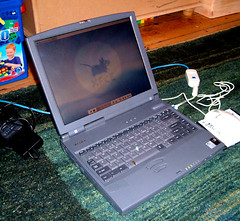
Ages ago I put Xubuntu – a cut-down version of Linux – on an ancient Toshiba Tecra 8000 laptop. The other day I found an old Cisco Aironet 350 wireless PCMCIA card lying around and it occurred to me that if I could get it working then this old laptop could be a bit more useful – if only for web-browsing in the tree house without worrying about the kids damaging my PowerBook.

The XFCE graphical environment I installed has very few bells and whistles – there’s certainly no GUI to tweak WiFi settings, so I plugged the Cisco card in the top PCMCIA slot and went to the command line and tried iwconfig to see what was wirelessly going on inside, if anything; it looked a bit like this, suggesting some WiFi action was possible on the eth1 interface:

interface:myname@tecra8000:~$ iwconfig

lo no wireless extensions.

irda0 no wireless extensions.

eth0 no wireless extensions.

eth1 IEEE 802.11-DS ESSID:” ”
Mode:Managed Frequency:2.417 GHz Access Point: 00:00:00:76:FC:04
Bit Rate:11 Mb/s Tx-Power=20 dBm Sensitivity=0/65535
Retry limit:16 RTS thr:off Fragment thr:off
Power Management:off
Link Quality=90/100 Signal level=-50 dBm Noise level=-98 dBm
Rx invalid nwid:14 Rx invalid crypt:0 Rx invalid frag:0
Tx excessive retries:0 Invalid misc:4253 Missed beacon:0

So then I edited the interfaces file like this:

sudo pico /etc/network/interfaces

to make the primary network interfaces section read like this, including the name of my wireless router and its WEP key:

# The primary network interface
auto eth0
iface eth0 inet dhcp
auto eth1
iface eth1 inet dhcp
wireless-key abcdef123456
wireless-essid MyRouterSSID

And then I restarted networking like this:

sudo /etc/init.d/networking restart

Then to get the machine to start the graphical environment as soon as I log in at the command line, I added these lines to /home/myname/.bash_profile:

if [ "$(tty)" = "/dev/tty1" -o "$(tty)" = "/dev/vc/1" ] ; then
startx
fi

Brilliant!

Posted in computers, hardware, Linux, operating systems, thrift, Ubuntu, WiFi, XFCE, Xubuntu | 1 Comment