Meet the Arduino

I was getting a bit fed up waiting for my Raspberry Pi to arrive, so when a colleague said he’d ordered an Arduino, I decided to get one too – even though the Arduino is more expensive and less-powerful. It turns out, though, that even the simple Arduino can be a great, inexpensive tool for teaching programming, maths and electronics, all at the same time.

Comparing Raspberry Pis and Arduinos is a bit like comparing, if you’ll forgive me, apples and oranges. The former is a tiny, cheap Linux computer, the latter is… well what is it? It’s kind of hard to explain. It’s a self-contained micro-controller that you program using a computer (any computer) and wire up to almost anything you can think of to make a little gizmo. We’re starting with lights and switches and buzzers, but ultimately I want to hook up displays and get it talking to the internet so I can make a box that tells me when the next train into town is due.
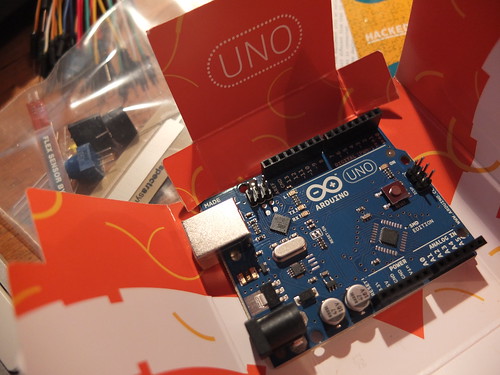
I got tired of waiting for my Raspberry Pi
We got the Sparkfun ‘Starter Kit for Arduino’ from Proto-PIC. It arrived in less than 2 days and cost £42 including post and packing. This contains an Arduino Uno board, a breadboard, some LEDs, resistors, jumper leads, buzzer, potentiometers and more – but no instructions! I know a bit of programming, but hardly anything about electronics, so we had to dive in the deep end.

First we downloaded the Arduino software environment – you can get this for Windows, Linux and Macs. You use this to program the Arduino and tell it what to do. We plugged our new baby in to the computer by its USB lead, and uploaded the first sample bit of code included with the software – to make the onboard yellow LED (on pin 13) blink (keeping an eye out for weeping angels, of course).

Bread and butter

Next we decided to wire something up to the Arduino – we started with an external red LED which we would make light up. This required using the breadboard. Now I’ve seen breadboards before – funny plastic strips full of holes for making electronic prototypes – but I’d never used one. I had a vague idea the holes must be connected somehow underneath, but I didn’t know how. Thanks to a nameless professor, I now do:

So now I knew that the rows of holes on each side of the breadboard were wired together, allowing you to connect wires and LEDs and resistors and things without a soldering iron. I hate soldering irons, even if I am quite partial to the smell of flux. It’s a Proustian thing. I digress…
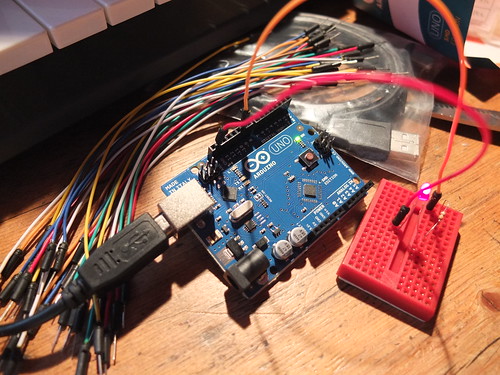
Our first Arduino circuit

So, we took a jumper wire from pin 9 on the Arduino, and plugged it into the breadboard. It seems a resistor is needed to stop too much electricity getting to the LED, so we plugged one end of a 330 ohm resistor into the same row on the breadboard, and hopped the other end of it onto a new row. On that new row, we plugged in one leg of the red LED. William noticed that LEDs are not symmetrical – one leg is longer or bows out. This is because LEDs only work when they are the right way round – they only let electricity flow through in one direction.

We then took another jumper lead from the other leg of the LED and connected it back to the GND (earth) pin on the Arduino – this completes the circuit.

Rather than just blink on and off, we decided to make this LED pulse on and off gradually, using this sample ‘Fade’ code provided with the software. It worked first time! (If you want to study the code, you need to look at this page on a computer – it gets truncated on a phone screen.)

/*
 Fade
 
 This example shows how to fade an LED on pin 9
 using the analogWrite() function.
 
 This example code is in the public domain.
 
 */
int brightness = 0;    // how bright the LED is
int fadeAmount = 5;    // how many points to fade the LED by

void setup()  {
  // declare pin 9 to be an output:
  pinMode(9, OUTPUT);
} 

void loop()  {
  // set the brightness of pin 9:
  analogWrite(9, brightness);    

  // change the brightness for next time through the loop:
  brightness = brightness + fadeAmount;

  // reverse the direction of the fading at the ends of the fade: 
  if (brightness == 0 || brightness == 255) {
    fadeAmount = -fadeAmount ; 
  }     
  // wait for 30 milliseconds to see the dimming effect    
  delay(30);
}

The obvious thing to do now was to muck around with the code to alter its behaviour. We changed the fadeAmount variable to have different values, and discovered this made it pulsate at different rates. We also found that if the fadeAmount variable wasn’t a factor of 255, it didn’t pulsate very nicely. We looked at the code to figure out why that might be. The key is in the lines:

  // reverse the direction of the fading at the ends of the fade:
  if (brightness == 0 || brightness == 255) {
    fadeAmount = -fadeAmount ;
  }

So I did a bit of reading up on the syntax of the programming language to work out what that line of code actually means in plain English: ‘if the brightness is equal to zero, OR equal to 255, then flip the direction of the fade’. The two vertical pipe lines || mean ‘or’. As our fadeAmount might not be a factor of 255, the brightness might never exactly equal 255, so we changed it to flip the direction of fade when the brightness is greater than 240:

  // reverse the direction of the fading at the ends of the fade:
  if (brightness == 0 || brightness > 240) {
    fadeAmount = -fadeAmount ;
  }

So in about an hour, William (aged 9) and I had learnt a bit about programming, a bit of maths and a little bit of electronics.

Setting the Arduino free

That’s all well and good, but the Arduino was still connected to the computer by its umbilical USB cord. It felt like the computer was still in charge, even though we were just using it to supply electricity and occasionally reprogram the board. I wanted to cut the apron strings and set the Arduino free.

The Arduino has a socket for a DC power supply, so I rummaged around in The Drawer of Many Orphaned Phones, Leads and Power Supplies and found one that fitted the bill. It’s important to ensure it doesn’t supply too many volts – between 7 and 12 is ideal, and the plug must have a positive inner pin. I found this article very helpful: http://arduino.cc/playground/Learning/WhatAdapter

We unplugged the Arduino from the computer’s USB cable, plugged the power supply in – and it worked! Quite emotional, really – our first Arduino machine making its way in the world, all on its own. *Sniff*.

Next time: how we made red and yellow LEDs pulsate alternately.

I’ve subsequently found this tutorial, but we had fun working this out for ourselves! http://www.sparkfun.com/tutorials/145

Posted in Arduino, children, computers, education, hardware, ICT | Tagged | Leave a comment

Library etiquette

I discovered today that in the library it is apparently acceptable to:

  • Huff and puff and mutter ‘fucking bastards’ under your breath whilst looking at the internet.
  • Consume a large packet of croissants and slurp coffee.
  • Have an insanely loud mobile phone conversation along the lines of ‘NO! NO! CALL THE LANDLINE! THE LAND LINE! HE’S LOST HIS PHONE!’
  • Have a stupidly loud stupid emergency siren ringtone.
  • Spend 5 minutes arranging your coat and bag in an unbelievably noisy way. How is it possible to make so much noise with one article of clothing?
  • In an almost empty library, sit at the computers closest to the man with his head in his hands trying to write on his laptop, and do all of the above.
Posted in Uncategorized | Tagged , | Leave a comment

Flash fiction

Flash fiction is an appealing thing. There’s no set definition, but the general idea is a very short piece of writing, perhaps 500 words or fewer, which should be written quickly.

16th of May is National Flash Fiction Day – why not have a go at writing some?

Turns out I’d already written some flash fiction in 2008, only I didn’t know that was what it was called then. I’ve tweaked and trimmed it a bit to get it to 399 words. 401 including the title:

Ugly Bloke.

What is it with beautiful women and ugly blokes?

You’ve heard that before, right – some stand-up or other? But it truly happens and it makes me crazy with fury and rage at the injustice of it.

I took the 9.23 train. Every day. I used to see this couple sitting in my carriage. He was – anyone would agree with me – an ugly bloke. His physique was nothing special. His face suggested that he’d sprung forth by some process of spontaneous generation from the lower layers of silt at the bottom of the gene pool. At least you’d think that if you saw him on his own – but he wasn’t on his own, was he?

No, he was always sitting next to his girlfriend (surely not wife) – the not-quite-domestic goddess. Late 30s, I’m guessing no kids, dripping in Boden, her long dark hair framing her perfect face and lips that would kiss. She looked a bit Nigella-ish, but less playful, less – oh I don’t know…. less obvious.

I was bewitched. Maddened. Intrigued. Every morning there they were on the 9.23, every morning I was trying to figure out exactly what she saw in him. His repartee? Nothing doing there. His wealth? The shoes and watch say no. Good in bed? That must be it. Bastard. Lucky, lucky bastard. I hate you. I wish bad things upon you. I want you out of her life. I want her for myself.

Then one day he got on the train with his arm in plaster. After that he wasn’t on the train so much. I still saw her, though, every day at 9.23, she pitched up just in time. She was what Jerry Seinfeld would call a ‘close stander’. I must have unknowingly taken the spot on the platform that she had decided long ago was her spot. I was always there long before her, and always, even if the platform was empty, she would stand unfeasibly close to me. And then when we got on the train she always turned right, I always turned left.

I never saw him on the train again. Not once.

Then last week, I was wandering home in the twilight and saw him ahead of me. Ugly bloke. Ugly bloke more dishevelled than normal, shuffling down my street with a handful of old carrier bags.

Walking up my path. Knocking on my door.

Posted in fiction, literature | 2 Comments

Farewell to Bush

Bush House
I had no idea this film was being made until today – Thomas Hannen and Owain Rich have made a beautiful sequence of images using some of the voices I and others recorded for the radio programmes John Tusa and Anna Horsbrough-Porter made about the BBC World Service leaving its longtime home in Bush House near Covent Garden in London.
millennium night
I’m biased because I worked in Bush House for about 20 years, the stones, mortar and dust of the fabric of the building are filled with a million memories, good and bad…
Head of Ducts' Office

I’ve had an emotional rollercoaster of a day and it was so wonderful to end it by being sent this beautiful little film, and so honoured to be included among so many amazing people and voices.
My last World Briefing TX

Posted in BBC, media, nostalgia, radio | Tagged , , | 1 Comment

Cool things to do with a Humax HDR-FOX T2

Just a quick brain-dump of things I’ve discovered about the Humax HDR-FOX T2 Freeview HD box in my first few hours of ownership…

  • I set it to 1080p video output via the supplied HDMI cable on our Sony Bravia Freeview HD TV. The picture quality is stunning, even on non-HD Freeview channels.
  • I connected the box to the my broadband modem / router by ethernet to enable the BBC iPlayer – this also got the Humax box on my home network.
  • It has a built-in FTP server – you can turn this on under the internet settings menu. Transferring files ON to the Humax is much easier by FTP than mucking around with USB sticks (though USB sticks are needed to get recordings off the box). If you look under the internet settings you’ll also find the box’s IP address. Probably ought to make this static, as it will likely change every time it’s turned on, but anyway I scribbled the address down.
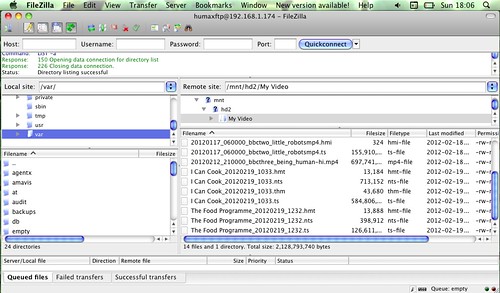
  • On a computer on my home network I used an FTP client (FileZilla) to connect to the box, using the Humax box’s IP address, the username humaxftp and the password 0000.
  • browsing Humax by FTP

  • You can then see the Humax’s ‘My Video’, ‘My Photo’ and ‘My Music’ folders on your computer’s FTP client.
  • I transferred three different types of BBC Redux file from the computer to the Humax box using FTP. (If you don’t know what BBC Redux is, skip this bit.)
  • The Redux .TS MPEG 2 original data stream plays but you can’t fast forward or rewind.
  • The much smaller Redux .TS MPEG 4 file played but also wouldn’t allow skipping within the file.
  • Amazingly, the small Redux high bit-rate h.264 MP4 version, described as ‘suitable for iPad, tablet computers, TVs’ file played, looked pretty good AND allowed navigation – fast forwarding and rewinding. This is more than I could have dreamed of!
  • These files also play off a USB stick stuck in the back of the Humax.
  • Apparently the Humax box encrypts recordings it makes itself, so you can’t get those off by FTP. You can copy SD (non-HD) recordings to a USB stick and take the files elsewhere, but not HD recordings. One way round this that doesn’t involve mucking around with the Humax’s firmware is to use something called Foxy. This doesn’t break the encryption itself, rather it modifies an HD recording so you can copy it back onto the Humax and the Humax box will then decrypt it when you copy it off again.
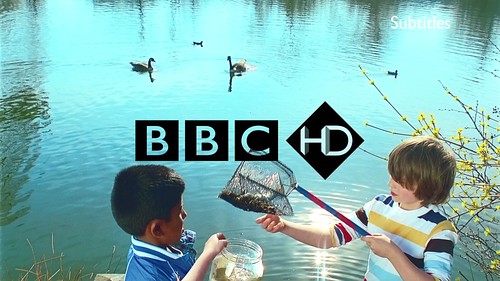
  • screengrab off Humax HD file playing on Mac

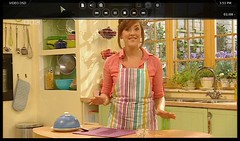
  • Foxy is a Windows .NET application. This is a bit of arse as my main computer is an iMac. But it looks like you can run Foxy on a Mac… you need to download and install the Mono runtime for OSX. Once you’ve installed it, you need to use the OS X command line to find Foxy.exe and run it using the command mono Foxy.exe - I can’t vouch this works for sure but the Foxy window appears on my iMac desktop and seems to work as you’d expect. Following the instructions I got the Humax to allow copying of an HD recording to a USB stick, though it was very slow and an error saying there wasn’t enough disk space flashed up at the end. When I copied the .TS file to my iMac’s hard drive, the video played flawlessly in VLC and looked gorgeous, but there was a problem with the sound – rather distorted. Will try again with a shorter programme – 40 mins of PanAm in HD is 1.64 GB (ouch!).
  • vlcsnap-2012-02-19-16h49m08s179

  • I’ve not looked into DLNA servers yet – as I have a Mac it seems to be a toss-up between Twonky and MediaLink – neither of which is free. I’m going to look at Twonky first.

Day 2 update.
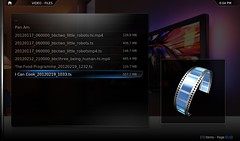
browsing Humax on a netbook in XBMC xbmc
The Humax actually has its own DLNA server – you turn it on in the same place you turn on the FTP server. Using this I managed to watch an SD (non-HD) recording made on the Humax back on my netbook using the free XBMC media player on the laptop. This doesn’t copy the file, it streams it off the Humax onto the laptop over my wifi network. Pretty cool – means I can watch recordings back upstairs, though it doesn’t work with HD programmes.

Posted in BBC, internet, MacOS X, media, TV | Tagged , , | 30 Comments